The short version
One folder, one naming rule, one weekly habit:
- A Receipts folder in Documents, with a folder per year and per month.
- Every receipt named
date merchant amount, year first. - Once a week, move the week’s receipts from Downloads, Mail and your camera into the month’s folder.
The rest of this guide is how to do each step quickly on a Mac, and what to do with paper receipts, emailed ones, and the ones you need at tax time.
Set up one folder
In Documents, make a Receipts folder, then a folder per year and per month inside it:
- Receipts ▸ 2026 ▸ 2026-09
- Receipts ▸ 2026 ▸ 2026-10
Month folders are the right size: an expense report or a tax question is almost always about a month or a year.
Name each receipt so it sorts itself
Start with the date, year first, then the merchant and the amount:
2026-09-14 Office Depot $38.20.pdf
Finder then lists receipts in date order, and you can find one by typing the merchant or the amount in the search field. Select a file and press Return to rename it.
Scan paper receipts with your iPhone
- In Finder, open the month’s folder.
- Control-click inside it and choose Scan Documents (on some versions of macOS, under Import from iPhone or iPad).
- Your iPhone opens its camera. Scan the receipt, tap Save, and the PDF lands in that folder.
It needs an iPhone signed in to the same Apple Account, with Wi-Fi and Bluetooth on for both, and close to the Mac.
Email and web receipts
- PDFs: in Mail, drag the attachment straight into the month’s folder, or Control-click it and choose Save Attachment….
- Receipts in the email body: choose File ▸ Export as PDF… in Mail, or File ▸ Print, then PDF ▸ Save as PDF, and save it into the month’s folder.
- Web receipts and order pages: in Safari, choose File ▸ Export as PDF… on the order page.
- Receipts as photos: if you took a photo of a receipt, drag it from Photos into the month’s folder; Finder makes a copy, and you can delete it from Photos afterward to keep receipts out of your camera roll.
Set your browser and Mail to save downloads to one place you check weekly, such as Downloads, so nothing lands somewhere you’ll forget.
Paperless: what to keep on paper
Many people keep only a clear scan once it’s backed up. Whether that’s enough for your taxes depends on where you file, so check your tax authority’s record-keeping rules before you shred anything. Keep paper originals where a warranty or a store asks for them, such as receipts for large purchases you may need to return or claim on.
Back up your receipts
A folder on one Mac is one spill away from gone. Turn on Time Machine with an external drive, or keep the Receipts folder in iCloud Drive (with Desktop & Documents Folders on, Documents already is). Receipts are small; years of them take less room than one video.
Tag what you’ll need at tax time
Control-click a receipt, choose Tags…, and add a tag such as Tax 2026 or Business. Click the tag in Finder’s sidebar to see every receipt with it, whatever month it’s in. Or make a Smart Folder for Name contains 2026 in Receipts. See how to use Smart Folders.
Find a receipt fast
With dates and merchants in the names, Finder’s search finds most receipts: open Receipts, press Command-F, choose Receipts beside Search, and type the merchant. Spotlight also reads the words inside PDFs, so a receipt from a PDF invoice is found by any word on it, such as an order number. Scanned receipts are searchable when your iPhone’s scan reads the text; photos of receipts are not, so name them well.
Do I need a receipt organizer app?
Not to keep receipts in order: a folder and a naming rule do that. Apps help with what comes next: reading the amounts for you, matching receipts to card charges, and making expense reports. Expense apps tied to a company card or an accounting service work well for a business that uses that service. If you only need your receipts read and turned into a report on your own Mac, see below.
Let your Mac file them
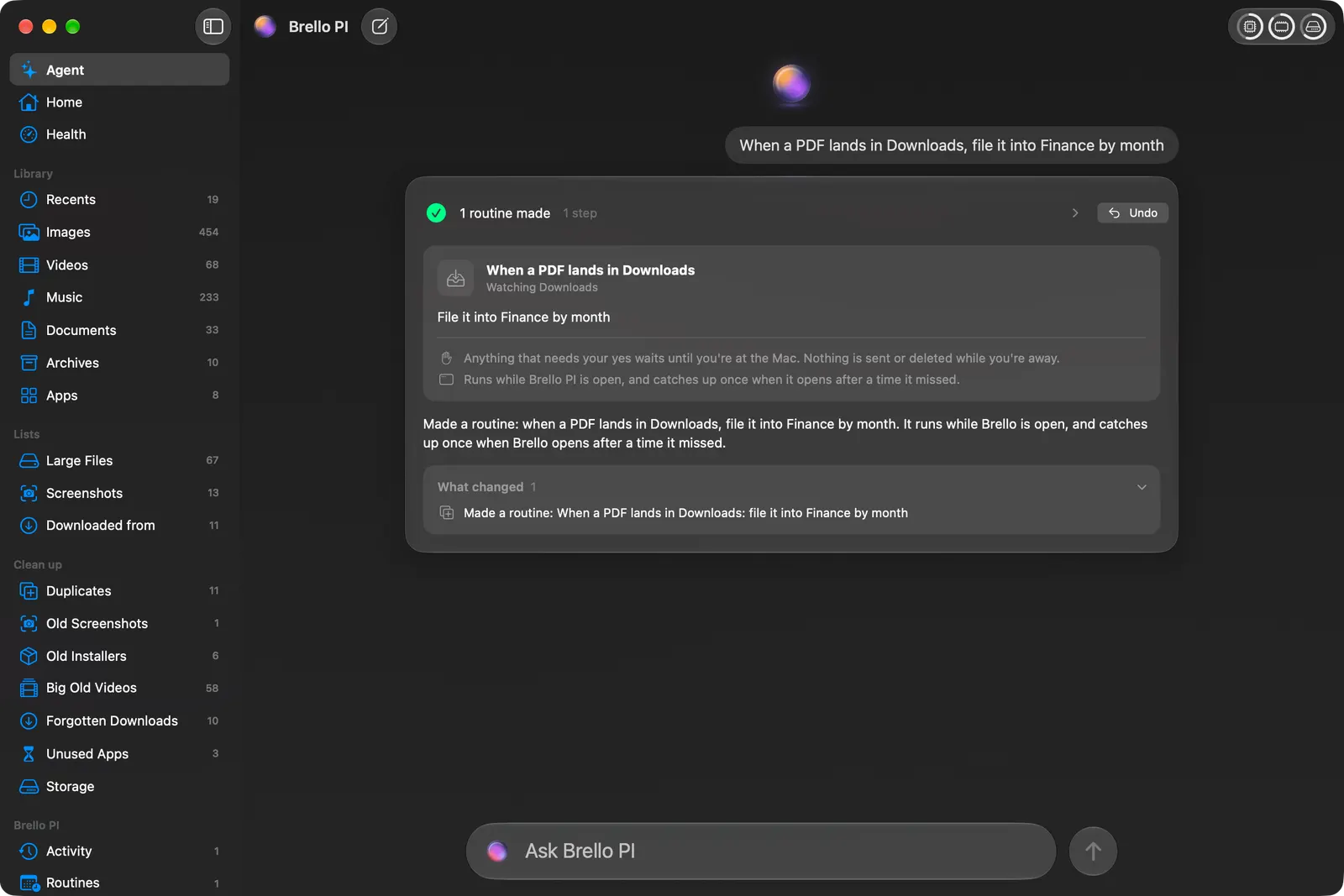
Brello, an AI agent for the Mac, can do the filing from a sentence:
- “When a PDF lands in Downloads, file it into Finance by month” becomes a routine that watches Downloads and files each PDF as it arrives.
- “Make an expense report from my September receipts and email it to Accounts” reads the receipts on your Mac, totals them, writes a checked PDF and drafts the email with it attached, for you to send. See how to make an expense report.
Every move has Undo, and your receipts stay on your Mac. Routines and handing off work need a Mac with Apple silicon, macOS 27 and Apple Intelligence.
How should I organize receipts for taxes?
By year first, since a tax return covers a year, then by month or by category. Tag what’s deductible or business-related as you file it, and at tax time open the tag to see every one. A year folder you can zip and send to an accountant in one step is worth the small effort each week. See how to zip files.
How long should I keep receipts?
It depends on where you live and what they’re for. Tax authorities set the rules: in the US, the IRS’s general rule is three years, the period in which a return can be amended or assessed, and longer in some cases, such as six years if income was left out. Other countries differ. Check the rules where you file.
Checked on macOS 27.0.1, November 2, 2026. Menu names can change with a macOS update.
Sources: Continuity Camera, scan documents on your Mac (Apple Support); How long should I keep records? (IRS).
In Brello’s help: Routines, Ask the agent.