What goes in an expense report
- Your name, and who it goes to (your manager, Accounts, or a client).
- The period, such as September 2026.
- One row per expense: the date, the merchant, what it was for, a category (travel, meals, supplies), and the amount.
- The total, in one currency.
- The receipts, attached or in a ZIP.
- Notes for anything unusual, such as a tip or a split bill.
An expense report template
Copy this into Numbers, Excel or Google Sheets. The rows are made-up examples; replace them with yours.
At the top: your name, your department or client, who approves it, the period (such as September 1 to 30, 2026), a project or cost code if your company uses one, and any cash advance you were given.
| Date | Merchant | Business purpose | Category | Paid with | Amount | Receipt |
|---|---|---|---|---|---|---|
| 2026-09-03 | Example Café | Lunch with a client, project review | Meals | Company card | $42.50 | 1 |
| 2026-09-12 | Example Taxi | Airport to office | Ground transport | Personal card | $38.20 | 2 |
| 2026-09-20 | Example Supplies | Printer paper for the office | Supplies | Personal card | $18.40 | 3 |
| Total | $99.10 | |||||
| Less paid with company card | −$42.50 | |||||
| Less cash advance | $0.00 | |||||
| Owed to you | $56.60 |
The Receipt column numbers each receipt so the approver can match it to the attached file named the same, such as 1 Example Café.pdf. Write dates year first so they sort in order, and keep one currency per report.
Categories most reports use
Use your company’s list if it has one. Otherwise these cover most expenses:
- Airfare, Lodging and Ground transport (taxis, ride shares, trains, parking, tolls)
- Mileage, for driving your own car: miles times a rate per mile
- Meals, with who was there for a business meal
- Supplies and Equipment
- Software and subscriptions
- Phone and internet
- Other, with a note
Mileage, tips and other currencies
- Mileage: list the date, the trip, and the miles, and multiply by your employer’s rate. Many US employers use the IRS standard mileage rate for the year, which the IRS publishes each year.
- Tips: include them in the amount, as the receipt’s total shows, and note them if your policy limits them.
- Another currency: record the amount you were charged in your own currency, from your card statement, and note the original amount. One currency per report keeps the total right.
- Split bills: claim only your share, and say so in the purpose.
Make it on a Mac by hand
- Gather the receipts into one folder, such as Documents ▸ Expenses ▸ 2026-09. Paper receipts can go straight there with your iPhone’s camera; see how to organize receipts.
- Open each receipt with Quick Look: select it and press Space. Use the arrow keys to move to the next one.
- Copy each line into the table. With Live Text you can select the amount or the merchant’s name on a photo of a receipt and copy it, which avoids typing mistakes. See how to copy text from an image.
- Total it with
=SUM()in the Amount column, and check the total against the receipts once more. - Export a PDF: in Numbers, choose File ▸ Export To ▸ PDF; in Excel, File ▸ Save As and choose PDF.
- Combine the receipts into one PDF if your company asks for one file: select them in Finder, Control-click and choose Quick Actions ▸ Create PDF.
- Email it with the report attached, and the receipts in a ZIP or the combined PDF. See how to zip files.
Make it in Numbers in five minutes
Numbers, free on every Mac, does the arithmetic for you:
- Open Numbers, choose File ▸ New, and pick a blank sheet.
- Type the headers from the template into the first row: Date, Merchant, Business purpose, Category, Paid with, Amount, Receipt.
- Select the Amount column, click Format in the toolbar, open the Cell tab, and set Data Format to Currency.
- Click the cell under the last amount, type
=SUM(and select the amounts, then press Return. - To see totals by category, select the table, click Organize in the toolbar, open Categories, and add a category by the Category column: Numbers groups the rows, and you can show a subtotal for each group.
Save it as a template with File ▸ Save as Template, and next month starts with the headers in place.
Make it from one sentence
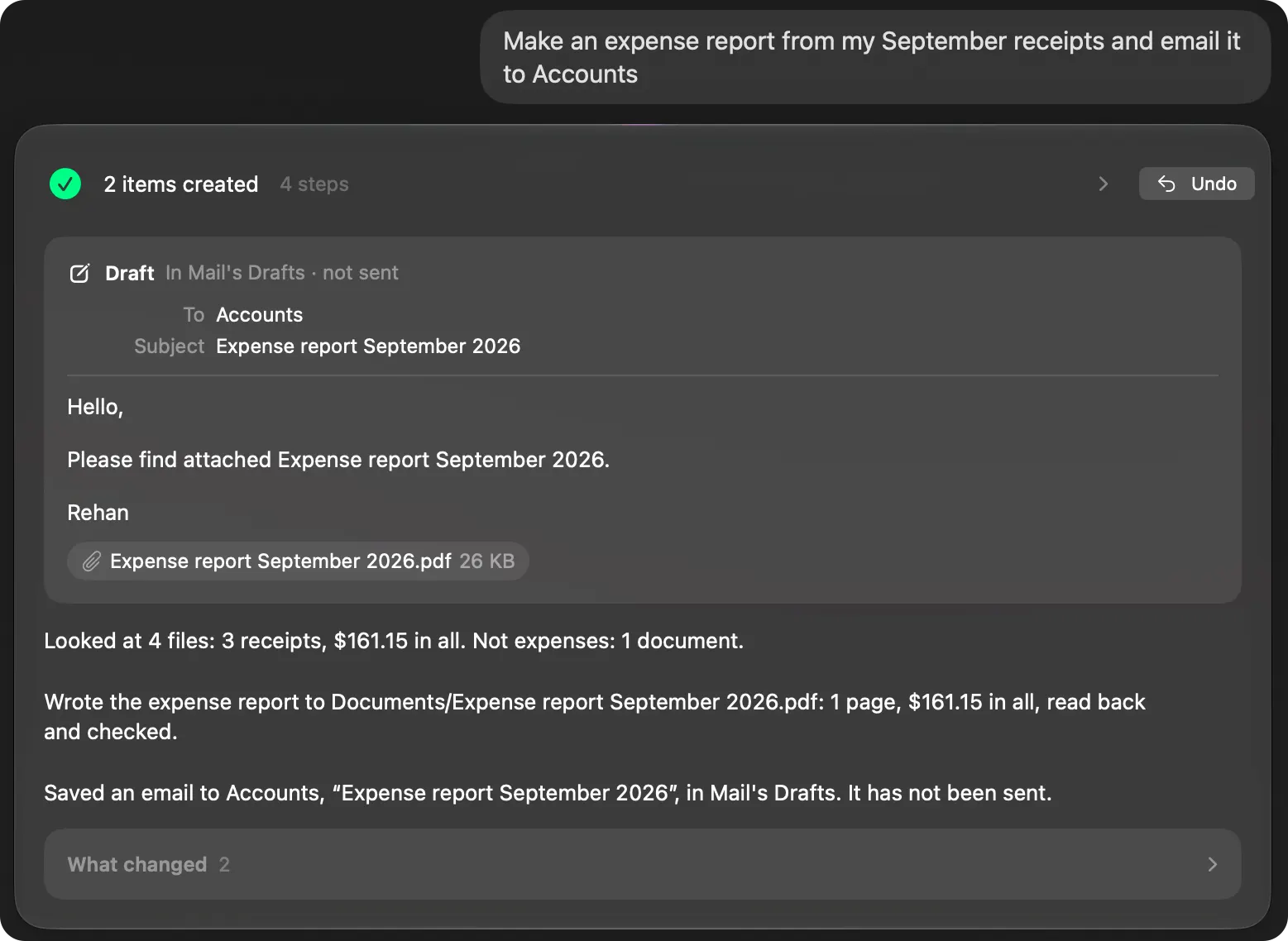
In Brello PI, type: “Make an expense report from my September receipts and email it to Accounts.” Brello PI:
- finds the receipts on your Mac and reads them there, with Apple’s on-device model and the Mac’s own text recognition;
- keeps September’s and leaves October’s out;
- totals them, $161.15 for three receipts on the sample Mac above;
- writes the report as a PDF to Documents, then reads it back and checks it;
- puts a draft to Accounts in Mail’s Drafts with the PDF attached. It isn’t sent: you read it and send it yourself.
Undo takes the PDF and the draft away. Your receipts never leave your Mac.
Want a spreadsheet instead? “Make a spreadsheet of my expenses from the receipts in Downloads” reads the receipts the same way and writes an Excel spreadsheet (.xlsx) of them to Documents, with no question first; Numbers and Excel both open it. Handing off work needs a Mac with Apple silicon, macOS 27 and Apple Intelligence.
What if a receipt is missing or unreadable?
Note it in the report with the date, the merchant and the amount, and say why there’s no receipt. A card statement showing the charge often helps. Most expense policies accept a note for small amounts; check yours.
How soon should I submit an expense report?
As your company’s policy says, often monthly. In the US, an employer’s reimbursement plan that keeps reimbursements tax-free generally expects you to account for expenses within 60 days after you paid them, and to return any excess within 120 days, according to IRS Publication 463. Submitting each month keeps you well inside both.
What makes an expense report get approved quickly?
A clear business purpose on every line, one receipt per row with matching numbers, the right categories, and a total that matches the receipts. Most questions from an approver are about a missing purpose or a receipt that doesn’t match the amount.
Is there a free expense report template for Mac?
The template above works in Numbers, which is free on every Mac, and in Excel and Google Sheets. Numbers also has budget and invoice templates in File ▸ New; a plain table like this one is all most expense reports need.
Checked on macOS 27.0.1, November 2, 2026. Menu names can change with a macOS update.
Sources: Export to other file formats in Numbers on Mac (Apple Support); Publication 463, Travel, Gift, and Car Expenses (IRS); Standard mileage rates (IRS).
In Brello’s help: Ask the agent.