What is an AI agent on a Mac?
An AI agent is an app that doesn’t just answer: it does the work. You describe a task, and it takes the steps, such as finding files, writing a document, changing a setting or drafting an email, then shows you what it did. A chatbot hands you text to copy; an agent hands you the finished result.
On a Mac that means four things worth checking before you choose one: what it can reach (your files, your apps, the web), where its AI runs (on your Mac or on a company’s servers), how it checks its work (does it ask first, and can you undo?), and what it costs.
The main AI agents for Mac, compared
| Strongest at | Where its AI runs | Price, as each site says | |
|---|---|---|---|
| ChatGPT for Mac | Writing, research, code | OpenAI’s servers | Free; Plus $20 a month |
| Claude for Mac | Writing, analysis, code | Anthropic’s servers | Free; Pro $20 a month |
| Perplexity Personal Computer | Tasks across the web and services | Cloud, hybrid, or a downloaded model | Free; Pro $17 a month billed yearly |
| Brello | Work on your Mac: files, documents, settings, health | Apple’s on-device model, built into macOS | $20 at launch, then $50, one time |
ChatGPT, Claude and Perplexity each need an account; Brello needs none. Brello reads each change back from macOS or the disk and offers Undo; the others don’t describe an Undo on their pages. Each row was read from the maker’s own site on October 30, 2026. Prices change, so check before you buy.
When to choose ChatGPT or Claude
Choose one of these when most of your work is in words or code: long drafts, research, analysis, programming. Both have desktop apps for the Mac with a shortcut from anywhere. ChatGPT can use the browser and desktop apps in its Work mode; Claude connects to apps and services through connectors and runs Claude Code in the app. Their models run in the cloud, so what you share with them is sent to OpenAI or Anthropic. See Brello and ChatGPT and Brello and Claude.
When to choose Perplexity’s Personal Computer
Choose it when your tasks live on the web and across services: it works with the Comet browser and 400+ connectors and can run in the background. It can also run fully on your Mac with a model you download, on a supported Apple silicon Mac with 36 GB of memory recommended. See Brello and Perplexity.
When to choose Brello
Choose Brello when the work is on your Mac. It’s built for the jobs that take many steps by hand:
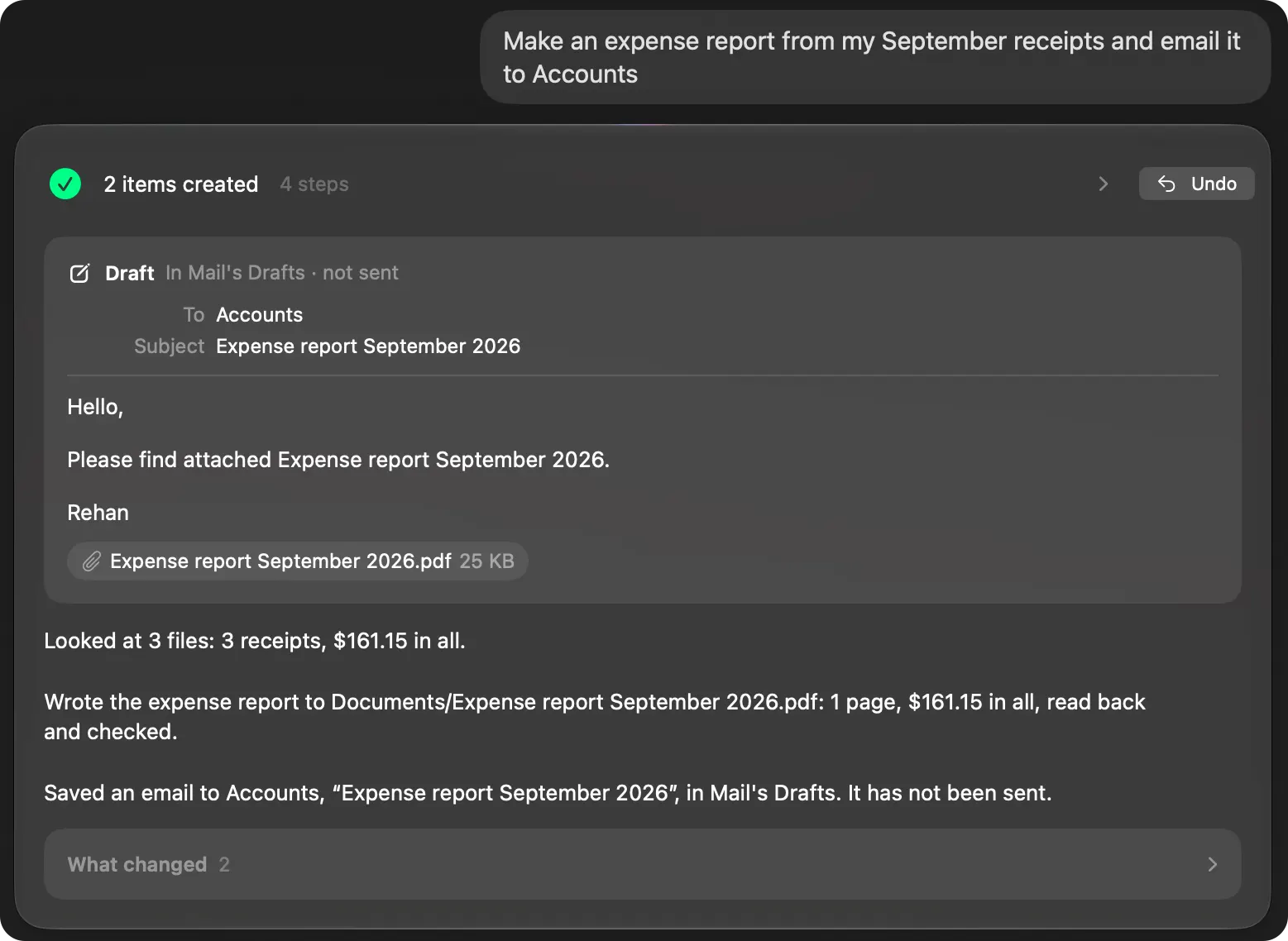
- “Make an expense report from my September receipts and email it to Accounts”: the receipts read, totaled, written to a PDF that Brello reads back and checks, and a draft with it attached, for you to send.
- “Put all my 2025 invoices in one folder, zip it and draft an email to my accountant with it attached.”
- “Get my Mac ready for a presentation: hide the Dock, mute it and keep it awake for 2 hours”: three settings, each checked with macOS, one Undo.
- “When a PDF lands in Downloads, file it into Finance by month”: a routine that watches the folder.
Around the agent, Brello shows every file on your Mac by kind, lists what’s safe to delete before anything goes to the Trash, and shows your Mac’s health in plain words. It thinks with Apple’s on-device model, so your files stay on your Mac, and it needs no account. It isn’t built for long research or code; pair it with a chat app for those.
Can I use more than one?
Yes, and most people will. A chat app for writing and research and Brello for the work on your Mac don’t overlap much. Give each its own keyboard shortcut so they don’t clash.
What does an AI agent need to run on my Mac?
The cloud apps need a Mac that runs their app and an account; their AI runs on the maker’s servers. Agents that run on the Mac itself need Apple silicon. Brello’s agent uses Apple’s on-device model, so it needs a Mac with Apple silicon, macOS 27 and Apple Intelligence turned on in System Settings ▸ Apple Intelligence & Siri. Brello’s Home, Clean up and Health work on any Mac with macOS 14 or later, Intel included.
Checked on macOS 27.0.1, October 30, 2026. Menu names can change with a macOS update.
Sources: ChatGPT desktop app (OpenAI); Download Claude (Anthropic); Personal Computer for Mac (Perplexity); Run Computer locally on your Mac (Perplexity); Apple Intelligence (Apple).
In Brello’s help: Ask the agent, The agent isn’t available, When Brello goes online.