At a glance
| Perplexity Personal Computer | Brello | |
|---|---|---|
| What it is | An always-on agent across your files, Mac apps and the web | An agent for your Mac: files, settings, health, space |
| Where the AI runs | Cloud, hybrid, or fully on the Mac with a downloaded model | Apple’s on-device model, built into macOS |
| Hardware for on-device | A supported Apple silicon Mac; 36 GB of memory recommended for fully local, 32 GB for hybrid | Any Mac that runs Apple Intelligence with macOS 27 |
| Account | A Perplexity account | None |
| The web | Its strength, with the Comet browser and 400+ connectors | Asks once before a lookup; offers open-web searches to Safari |
| Your Mac’s health and space | No | Health, Balance the load, Clean up |
| Checking its work | Approvals for human-in-the-loop steps | Each change read back from macOS or the disk; one Undo |
| Price, as each site says | Free; Pro $17 a month and Max $167 a month, billed yearly, include Computer | $20 at launch, then $50, one time, for up to 3 Macs |
Where Perplexity is the better choice
- Tasks that span the web. Research, web apps and services through its connectors and the Comet browser.
- Running in the background. It can run continuously, and on a Mac mini you can start tasks from your iPhone and approve steps from any device.
- Its own models on the Mac. If you have a Mac with plenty of memory, it can run fully local with a model you download.
Where Brello helps
- Nothing to download or sign in to. Brello uses the model already in macOS 27, on Macs with Apple Intelligence, and needs no account.
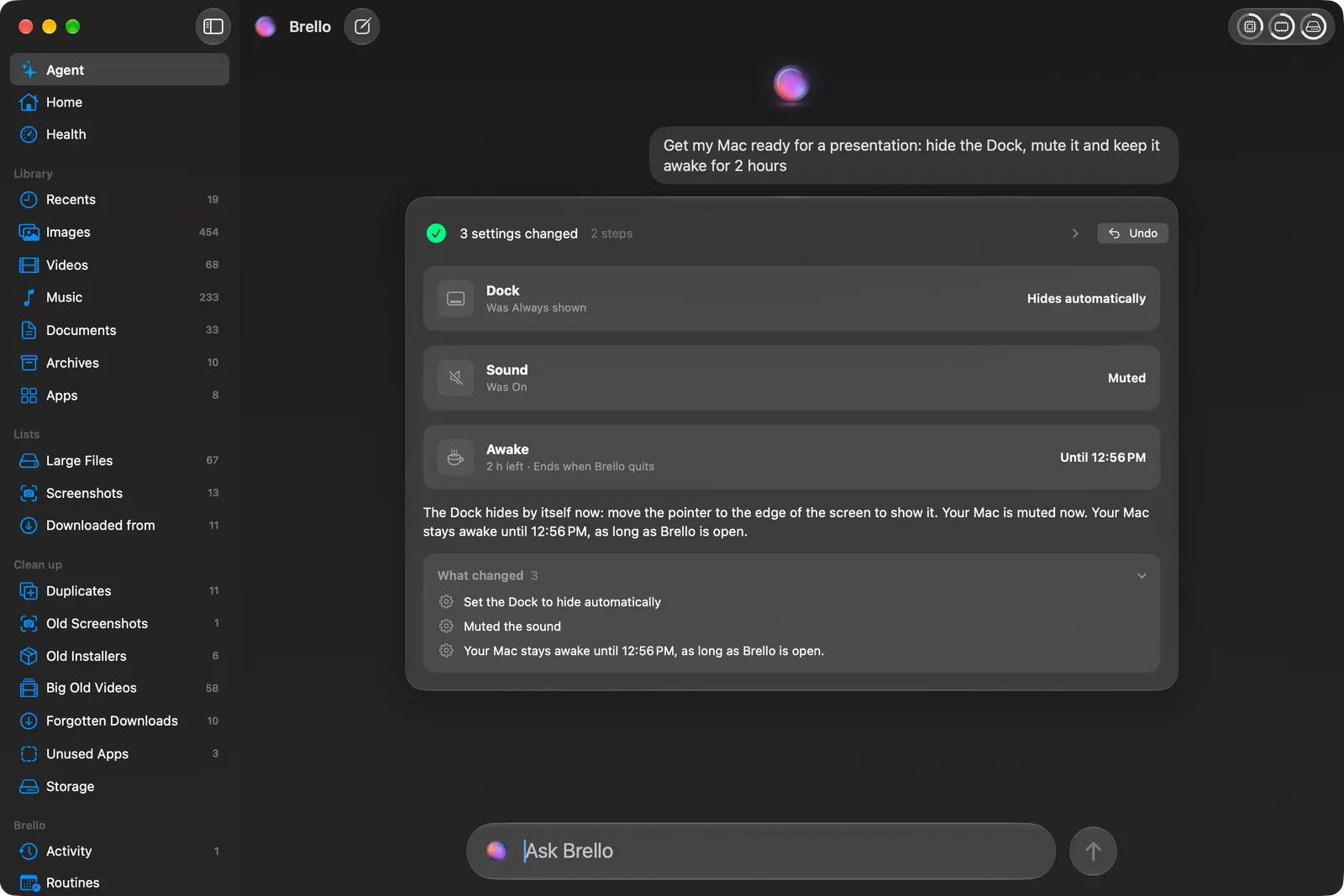
- Built for your Mac. “Get my Mac ready for a presentation: hide the Dock, mute it and keep it awake for 2 hours” makes three changes, checks each with macOS, and offers one Undo. “Set up Finder properly: show hidden files, file extensions, the path bar and the status bar” makes four.
- Your own documents, worked on locally. “Make an expense report from my September receipts and email it to Accounts” reads the receipts on your Mac, writes a checked PDF and drafts the email, not sent.
- Your Mac’s health and space. Health in plain words with Balance the load, Home with every file by kind, and Clean up, which deletes only after your yes, into the Trash, with Undo.
- Safe with nobody there. A routine that runs while you’re away never deletes, sends or goes online.
- One price. $20 at launch, then $50, once, with no subscription.
Can I use both?
Yes. Perplexity for research and work across the web; Brello for the work on your Mac itself.
Which to choose
- Choose Perplexity if most of your work is on the web, you want an agent that runs in the background across services, or you want to run large local models on a high-memory Mac.
- Choose Brello if you want your files, settings, space and health looked after from a sentence, on the model already in your Mac, with Undo and one price.
What you need for Brello
Home, Clean up and Health work on any Mac with macOS 14 or later. The agent needs a Mac with Apple silicon, macOS 27 and Apple Intelligence turned on.
We make Brello. What Perplexity does and costs was read from its maker’s own site on October 30, 2026, and may have changed since: