We read Maccy’s site, its README on GitHub and its Mac App Store page on November 26, 2026, with Apple’s, Raycast’s and Alfred’s pages the same day. What this page says about Maccy is from those pages. What it says about Brello PI is from its code and the captures on this page.
What Maccy is
Maccy’s site describes it as a “Clipboard manager for macOS which does one job - keep your copy history at hand.” It sits in the menu bar, keeps what you copy, and finds an item as you type. Its README lists five features: “Lightweight and fast”, “Keyboard-first”, “Secure and private”, “Native UI”, and “Open source and free”.
How to use Maccy
From its README:
| To | Press |
|---|---|
| Open Maccy | Shift-Command-C, or click its menu bar icon |
| Copy an item | Return, a click, or Command and the item’s number |
| Copy and paste an item | Option-Return, Option-click, or Option and the item’s number |
| Paste without formatting | Option-Shift-Return |
| Pin an item to the top | Option-P, again to unpin |
| Delete an item | Option-Delete |
| Clear everything not pinned | Option-Command-Delete |
| Clear everything, pinned too | Shift-Option-Command-Delete |
| Settings | Command-comma |
If pasting does nothing: its README says to turn on Paste automatically in its settings, and to add Maccy in System Settings ▸ Privacy & Security ▸ Accessibility. Without that, Maccy copies the item and you press Command-V yourself.
If your shortcut is taken: the README says to find it in System Settings ▸ Keyboard ▸ Keyboard Shortcuts, turn it off there, restart Maccy and set the shortcut again.
Free or $9.99?
Both are the same app. Maccy’s site says, “It is and will always be free.” You can download it from maccy.app or GitHub’s releases, or install it with brew install maccy. The Mac App Store sells it for $9.99 in the US, and its description says, “This version is being sold on the App Store to support the development.” Pay if you want updates through the App Store or want to support it.
Which Macs Maccy runs on
“Maccy works on macOS Sonoma 14 or higher,” its README says, and its App Store page asks for macOS 14.0 or later.
Is Maccy safe?
The app is open source under the MIT license, so its code can be read. Three things to know:
- Only download it from maccy.app, GitHub or the App Store. Its README opens with a warning: “Malicious sites (such as
maccyapp.netandmaccyapp.com) distribute malware disguised as Maccy,” and “maccy.app is the only official website.” - What it skips. By default it always ignores copies marked
org.nspasteboard.TransientType,org.nspasteboard.ConcealedTypeandorg.nspasteboard.AutoGeneratedType, the markers password managers and other apps put on secrets and short-lived copies. It also ignores 1Password’s and a few other apps’ own types, which you can change, and you can add any type. To leave out what your iPhone sends through Universal Clipboard, addcom.apple.is-remote-clipboardunder Preferences ▸ Ignore ▸ Pasteboard Types. - Where it keeps your history. “Everything is stored on your computer,” says its site, and “All the data is stored on your Mac and never leaves it,” says its App Store page. Neither says whether that history is encrypted.
Maccy and the alternatives
| Maccy | Spotlight | Raycast | Alfred | Brello PI | |
|---|---|---|---|---|---|
| Price, as listed | Free; $9.99 on the App Store | Part of macOS | Free; Pro $96 a year | Powerpack £40 once | $29.99 for a limited time, then $49.99, once |
| Open it | Shift-Command-C | Command-Space, then Command-4 | From its launcher; set a hotkey | A hotkey you set | Option-Space, then the clipboard button |
| Kept for | Not stated | Not stated on its page | Up to 3 months free; Unlimited on Pro | 24 hours to 3 months | 7 days to Forever; 30 days unless you choose |
| Off until you turn it on | Not stated | Not stated | Not stated | Yes | Yes |
| Skips password managers’ copies | Yes, by their markers | Not stated | Passwords and Keychain Access by default | Yes, by default | Yes, by marker and by app |
| Encrypted on disk | Not stated | Not stated | Not stated | Not stated | Yes, AES-GCM |
| Also | Nothing else, by design | Apps, files, actions | Launcher, snippets, windows, AI | Launcher, snippets, workflows | Launcher, snippets, windows, Mac health, an agent |
Spotlight’s clipboard history
If you’re on macOS 26 or later, try this first. Press Command-Space, then Command-4, or click the Clipboard button beside Spotlight’s field, and type to search what you copied. Clear it from the More button with Clear History. Apple’s page doesn’t say how long it keeps copies or how to turn it off.
Raycast and Alfred
Raycast keeps “all copied text, images, files, links, emails, and even colors” for up to 3 months on its free plan, with 6 months, 1 year and Unlimited on Pro, $96 a year. Return pastes into the app in front. It leaves out Passwords and Keychain Access by default, and you can add apps. See Raycast and its alternatives.
Alfred keeps text, images and file links, in its Powerpack, £40 once for Alfred 6. “By default, the Clipboard is disabled for your privacy”: you turn it on in Preferences ▸ Features ▸ Clipboard, allow Accessibility, and choose 24 hours, 7 days, 1 month or 3 months. It ignores popular password apps and concealed data by default. See Alfred for Mac.
Brello PI’s clipboard history
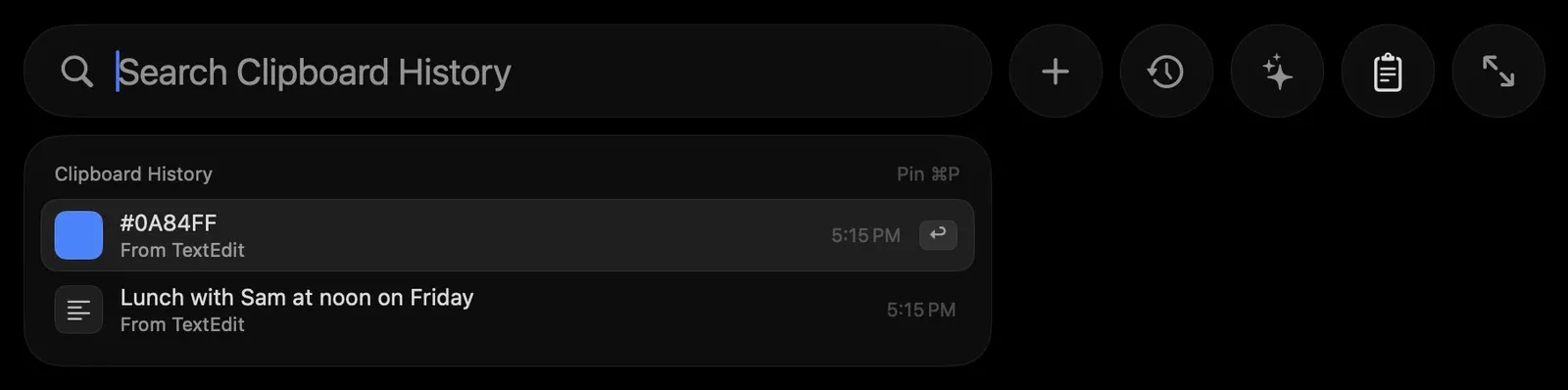
Brello PI’s clipboard history lives in the bar that Option-Space opens, beside its launcher. What it does, read from its code:
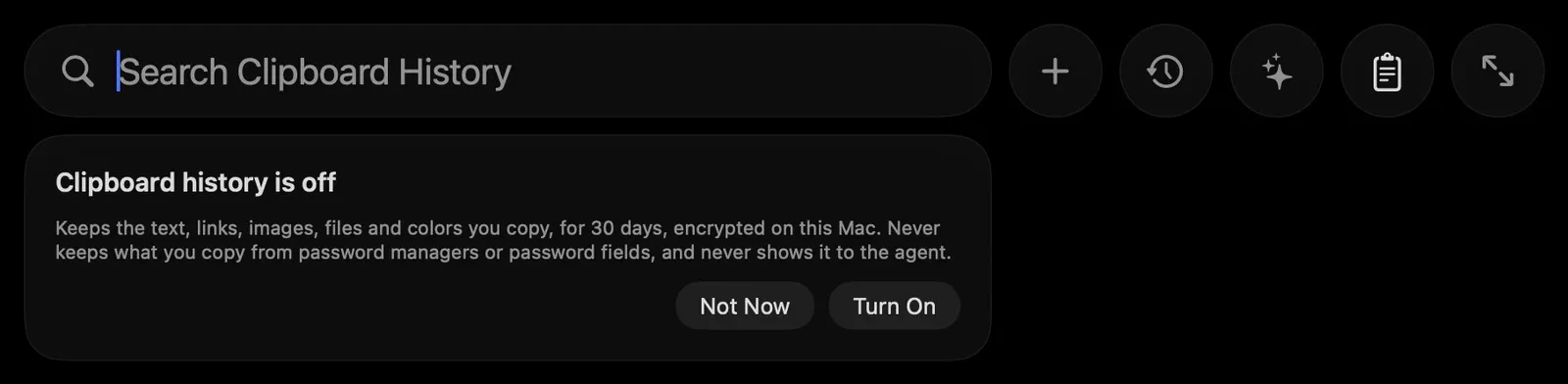
- Off until you turn it on. The capture at the end of this page shows the card you see first. While it’s off, Brello PI reads nothing from the clipboard, and it starts with what you copy after you turn it on, not what was there before.
- What it keeps: text, links, images, files and colors, each with the app it came from and the time. 30 days unless you choose 7 days, 3 months, 1 year or Forever. Command-P pins a copy, and pinned copies stay.
- What it skips: copies marked concealed, transient or machine-made, the same nspasteboard.org markers Maccy ignores, plus 1Password’s own and a few more. It never reads a copy made in Passwords, Keychain Access, 1Password or Bitwarden, or in an app you leave out.
- How it’s stored: encrypted with AES-GCM, with the key in your login keychain for Brello PI alone, in a file in Brello’s own folder that’s left out of backups. It’s never shown to Brello PI’s agent.
- Pasting: choose a copy and Brello PI puts it back on the clipboard and pastes it into the app in front, if you’ve allowed Accessibility. Without it, the copy waits on the clipboard for Command-V.
It checks for a new copy twice a second, the same rate as Maccy’s default.
Where Maccy is the better choice
- It’s free. Brello PI costs money; Maccy doesn’t.
- It does one thing. If all you want is a clipboard, nothing in Maccy is in the way.
- Its code is public. You can read exactly what it does with what you copy.
- Paste without formatting has its own shortcut.
Where Brello PI helps
- One bar for the clipboard and everything else. Apps, snippets, window keys, a calculator, and commands such as What’s Slowing My Mac and Free Up Space.
- Encrypted history, with password managers left out by app as well as by marker.
- An agent behind it. Type a request instead of a search, and Brello PI’s agent does it on Apple’s on-device model, with Undo.
Questions
How do I stop Maccy recording something sensitive?
Option-Shift-click its menu bar icon to skip only the next copy, or Option-click it to pause. For a script, its README gives defaults write org.p0deje.Maccy ignoreEvents true, then false again when you’re done.
Why doesn’t my Maccy shortcut work in password fields?
Its README says a shortcut that types a character, such as Option-C, which types “ç”, can be blocked by macOS security in password fields. It suggests remapping it with Karabiner-Elements to a shortcut such as Shift-Command-C.
Can Maccy check the clipboard faster?
Yes. It checks every 500 milliseconds; defaults write org.p0deje.Maccy clipboardCheckInterval 0.1 makes that 100 milliseconds, its README says.
How do I get Maccy’s footer back?
Open Maccy, press Command-comma, and turn the footer on under Appearance. If that doesn’t work, its README gives defaults write org.p0deje.Maccy showFooter 1.
Trademarks
Maccy is made by Alex Rodionov and is open source under the MIT license. Raycast is a trademark of Raycast Technologies Ltd. Alfred is a registered trademark of Running with Crayons Ltd. Spotlight and macOS are trademarks of Apple Inc. Brello PI, a product of Stuvio, isn’t affiliated with or endorsed by any of them. Names and prices as read on November 26, 2026.
What you need for Brello PI
The bar and its clipboard history work on any Mac with macOS 14 or later. The agent needs a Mac with Apple silicon, macOS 27 and Apple Intelligence.
We make Brello. What Maccy does and costs was read from its maker’s own site on November 26, 2026, and may have changed since:
- Maccy, read November 26, 2026
- Maccy on GitHub (README), read November 26, 2026
- Maccy (Mac App Store), read November 26, 2026
- Search your Clipboard history in Spotlight on Mac (Apple Support), read November 26, 2026
- Clipboard History (Raycast Manual), read November 26, 2026
- Raycast pricing, read November 26, 2026
- Clipboard History (Alfred Help), read November 26, 2026
- Alfred Powerpack, read November 26, 2026