What is the Alfred app?
Alfred is a keyboard launcher for the Mac, made by Running with Crayons. You press a hotkey, type a few letters, and Alfred opens an app, finds a file, searches the web or does a calculation, without the mouse. The core is free forever and runs on macOS 10.14 or later, on Intel and Apple silicon. The paid Powerpack adds workflows, clipboard history, snippets with text expansion, file navigation and more, for £34, or £59 with lifetime upgrades, as Alfred’s store says on November 2, 2026. The current major version is Alfred 5.
How to set up Alfred
- Download Alfred from alfredapp.com, open the download and move Alfred into Applications.
- Press Option-Space, Alfred’s default hotkey, and type the name of an app or file.
- In Alfred’s Preferences ▸ General, set a different hotkey if you like, and in Permissions choose Request Permissions…: Alfred needs Accessibility to type key combinations and expand snippets, and access to Contacts to show them in results.
- To buy the Powerpack, enter its license in Preferences ▸ Powerpack.
Using Command-Space instead of Spotlight: first turn off Spotlight’s shortcut in System Settings ▸ Keyboard ▸ Keyboard Shortcuts ▸ Spotlight, check that no input source uses Command-Space, then type Command-Space in Alfred’s hotkey field. Spotlight still opens from the menu bar.
If you use Brello PI too: Brello PI’s popup also opens with Option-Space. Give one of them another key, in Alfred’s Preferences or Brello PI’s Settings, so each shortcut opens one thing.
Free Alfred or the Powerpack?
The free Alfred launches apps, finds files by name, searches the web, calculates and opens system commands. Buy the Powerpack if you want:
- Workflows: automations built from blocks with no code, or shared by others.
- Clipboard history and snippets: everything you copied, searchable, and text that expands from a short keyword.
- File navigation: browse and act on files from Alfred’s window.
If you only launch apps and find files, the free core is enough, and macOS’s own Spotlight does much of the same.
At a glance
| Alfred | Brello | |
|---|---|---|
| What it’s for | Launching apps, searching and automating from the keyboard | Your files, your Mac’s health, and work done for you |
| From any app | Its launcher, from a hotkey | Brello PI’s popup, with Option-Space or a click in the menu bar |
| Finding files | By name, with file navigation in the Powerpack | Files as you type, and Home’s search by what you remember |
| Automation | Workflows you build from blocks, in the Powerpack | One sentence: “when a PDF lands in Downloads, file it into Finance by month” |
| Clipboard history and snippets | Yes, in the Powerpack | No |
| AI | Not part of its core | Apple’s on-device model, on your Mac |
| Requirements, as each site says | macOS 10.14 or later, Intel and Apple silicon | macOS 14 or later; the agent needs Apple silicon and macOS 27 |
| Price, as each site says | Free core; Powerpack £34, or £59 with lifetime upgrades | $29.99 for a limited time, then $49.99, one time |
Where Alfred is the better choice
- Speed at the keyboard. Alfred opens apps, searches and runs actions in a keystroke, and its core is free forever.
- Workflows you design. The Powerpack’s workflows connect building blocks into automations without code.
- Clipboard history, snippets and text expansion, which Brello doesn’t have.
- Older Macs. It runs back to macOS 10.14.
Where Brello helps
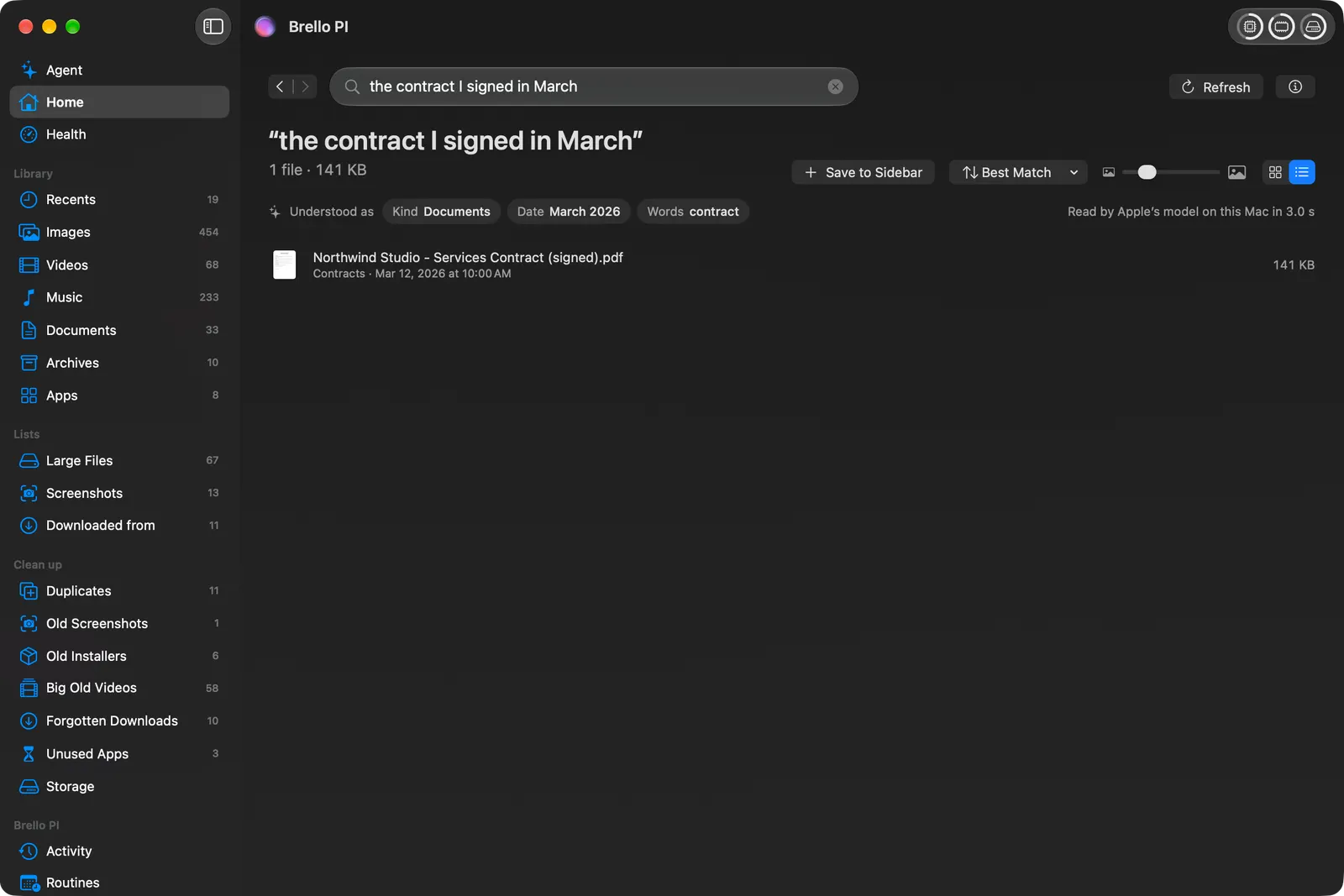
- Files by what you remember. “The contract I signed in March” is read as a kind, a date and a word, and Brello shows how it read your words above the results.
- Work that takes many steps by hand. “Make an expense report from my September receipts and email it to Accounts” finds the three September receipts, totals them, writes a PDF to Documents that it reads back and checks, and drafts the email with it attached, for you to send.
- Several settings at once. “Get my Mac ready for a presentation: hide the Dock, mute it and keep it awake for 2 hours” makes all three changes, checks each with macOS, and puts them all back with one Undo.
- Your Mac itself. Home counts every kind of file with its size, Clean up lists what’s safe to delete, and Health shows the processor, memory, disk and heat in plain words.
Can I use both?
Yes. Alfred stays your launcher. Brello PI’s popup has its own shortcut, which you can change in Settings so the two don’t clash.
Which to choose
- Choose Alfred if you want the fastest way to launch and automate from the keyboard, with workflows you build and clipboard history.
- Choose Brello PI if you want to hand off work in a sentence, find files by what you remember, and keep an eye on your Mac’s space and health, with Undo for every change.
Questions
Is Alfred free? Its core is free forever. The Powerpack is a one-time purchase, £34, or £59 with lifetime upgrades.
Is Alfred better than Spotlight? Faster to customize and to extend with workflows; Spotlight on macOS 27 has caught up on files, apps, quick actions and clipboard history. Raycast vs Alfred, and Spotlight.
Does Alfred have AI? Not in its core. Workflows can call AI services you set up yourself.
What you need for Brello
Home, Clean up, Health and the popup’s file search work on any Mac with macOS 14 or later. The agent needs a Mac with Apple silicon, macOS 27 and Apple Intelligence.
We make Brello. What Alfred does and costs was read from its maker’s own site on November 2, 2026, and may have changed since: