What is Hazel?
Hazel, by Noodlesoft, is a Mac app that organizes folders for you by rules. You tell it which folders to watch, such as Downloads or the Desktop, and give each folder rules. A rule has conditions, which a file must match, and actions, which Hazel then performs. Conditions can test a file’s name, date, kind and the site it was downloaded from, with pattern matching; actions can move, rename, tag, archive, open or upload a file, sort it into subfolders by name, date or any mix of its details, or run AppleScript, Automator workflows and Shortcuts. Hazel can also keep the Trash in check and, with App Sweep, offer to remove the files an app leaves behind when you delete it. The current version is Hazel 6, $42, or $65 for a Family Pack, with a free trial, as Noodlesoft’s site and store said on November 2, 2026.
How a Hazel rule works: an example
Say you want bills out of Downloads and into a folder per year:
- Add Downloads to the folders Hazel watches.
- Make a rule: if the kind is PDF and the name contains “invoice” or “bill”,
- then move it to Documents ▸ Bills and sort it into a subfolder named by the year it was added.
From then on Hazel files each matching PDF as it lands. Building the rule is up to you, and so is checking that it matches what you meant.
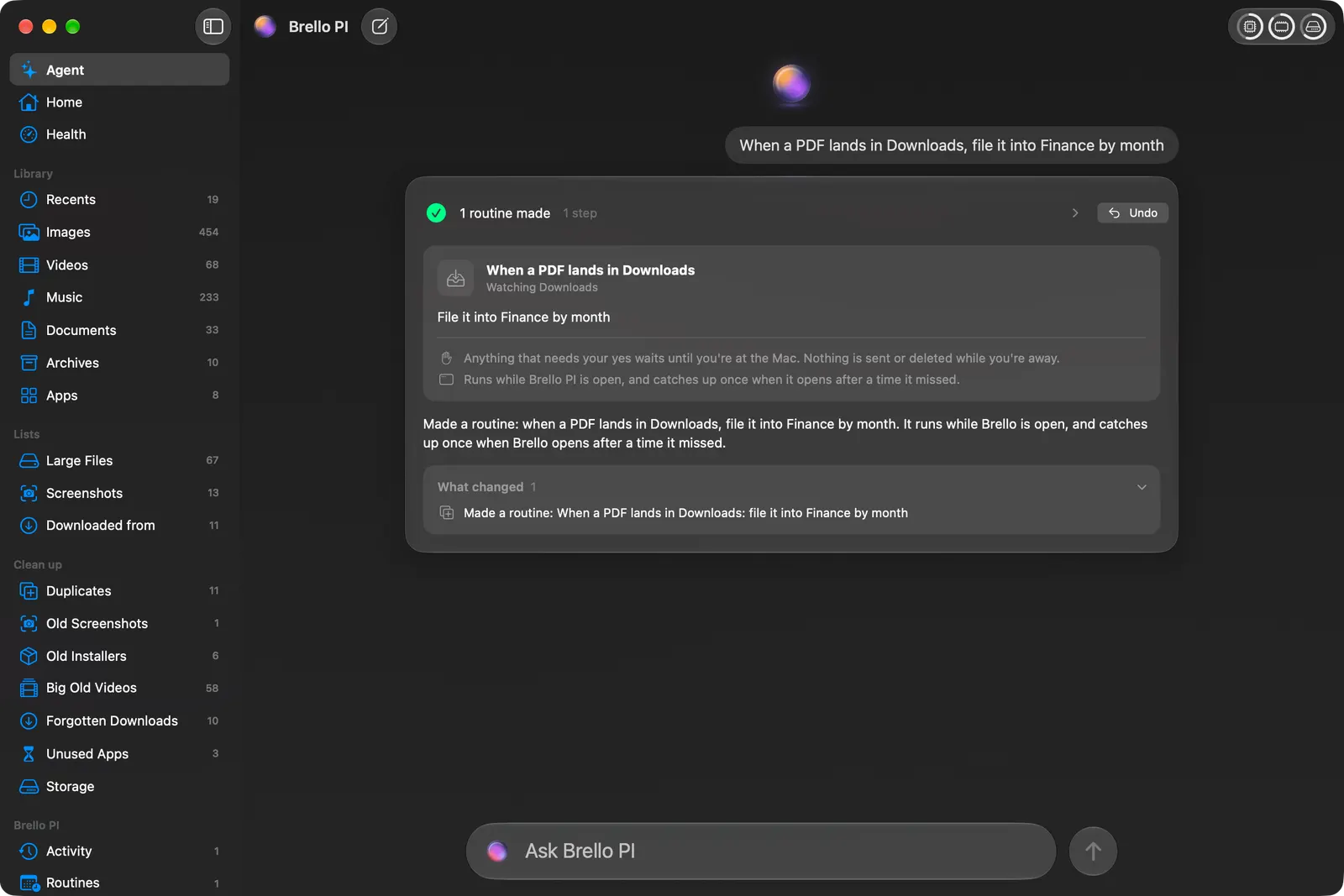
In Brello PI the same rule is one sentence: “When a PDF lands in Downloads, file it into Finance by month.” Brello PI reads it back to you as a routine before it runs, and Undo puts every moved file back.
At a glance
| Hazel | Brello | |
|---|---|---|
| What it’s for | Rules that file and clean up folders automatically | Your files, your Mac’s health, and work done for you |
| How you set it up | Build a rule: pick a folder, add conditions, add actions | Type it: “when a PDF lands in Downloads, file it into Finance by month” |
| Conditions | Name, date, kind, the site a file came from, pattern matching and more | What your sentence says: a kind, a folder, a date, a word |
| Actions | Move, rename, tag, archive, open, upload, run scripts | Move, rename by date, make folders, zip, write documents, draft emails |
| Before it runs | Rules run as you set them | The rule is read back to you; anything that deletes asks first |
| Undo | Not described on its page | Undo puts every moved file back |
| Trash and leftovers | Empties the Trash when it grows, App Sweep for leftover app files | Clean up lists what’s safe to go and deletes only after your yes |
| Price, as each site says | $42, Family Pack $65, upgrade $20, with a free trial | $29.99 for a limited time, then $49.99, one time, for up to 3 Macs |
Where Hazel is the better choice
- Fine-grained rules. Hazel’s conditions go deep: pattern matching on names, dates, kinds and where a file came from, nested conditions, and actions chained in order. If you already think in rules, Hazel gives you every switch.
- Scripts and other apps. Rules can run AppleScript, Automator workflows and Shortcuts, and import into Photos, Music and TV.
- Housekeeping on its own. It can empty the Trash when it gets too big and offer to remove the files an app leaves behind when you delete it.
Where Brello helps
- No rule-building. Say what you want in one sentence: “When a PDF lands in Downloads, file it into Finance by month.” Brello PI turns it into a routine, shows you what it understood, and watches the folder from then on.
- One-off filing too. “Tidy up my Desktop” sorts it into folders and lists every move before and after. “Put all my 2025 invoices in one folder, zip it and draft an email to my accountant with it attached” finds the invoices across your Desktop, Documents and Downloads, leaves the 2026 invoice and a 2025 quote alone, asks you for the accountant’s address and to confirm the plan, then makes the folder, the ZIP and the draft, not sent.
- Undo for every move. Each file goes back to where it was with one click.
- Safe when you’re away. A routine that runs with nobody at the Mac never deletes, sends or goes online.
- Built-in tidy rules. Two rules come with Brello PI, off until you turn them on: new screenshots sorted into monthly folders as they land, and old installers in Downloads asked about at 10:00 each day.
- More than filing. Home shows every file on your Mac by kind, Clean up lists what’s safe to delete, and Health shows how your Mac is doing in plain words.
Hazel alternatives
| How it works | Price, as each site says | |
|---|---|---|
| Folder Actions (Automator) | A workflow you build runs on files added to a folder; no Undo | Free, built in |
| Finder Smart Folders | A saved search gathers matching files and moves nothing | Free, built in |
| Keyboard Maestro | Macros you build, run on command or on a schedule | $36, one time |
| Brello PI | A sentence you type becomes a routine that watches a folder, with Undo | $29.99 for a limited time, then $49.99, one time |
| Hazel, for reference | Rules you build, with deep conditions | $42; Family Pack $65 |
Folder Actions, built into macOS
Automator, which comes with every Mac, can save a workflow as a Folder Action: it’s attached to a folder in Finder and runs on the files added to it. You can rename, move, convert or tag new files, and run scripts. It’s free, but you build each workflow by hand, it shows nothing before it acts, and there’s no Undo.
Finder Smart Folders
A Smart Folder is a saved search: choose File ▸ New Smart Folder, set conditions such as kind and date, and save it. It always shows every file that matches, wherever it lives, without moving anything. It’s the safest way to “organize” when you only need to find things, and it’s built in. See how to use Smart Folders.
Keyboard Maestro
Keyboard Maestro automates apps, websites, text and images with macros built from hundreds of actions, with conditions, loops and triggers that run on command or on a schedule. It’s a one-time $36 and runs on macOS 10.13 or later. It’s a general automation tool rather than a filing app, and very capable once you learn it.
Which one for which job
| Job | Best fit | Why |
|---|---|---|
| File every PDF from Downloads into a folder by month, forever | Hazel or Brello | Hazel with a rule you build; Brello from the sentence “when a PDF lands in Downloads, file it into Finance by month” |
| Sort new screenshots into monthly folders | Brello PI’s tidy rule, or Hazel | Brello PI has it built in, off until you turn it on |
| See every file of a kind in one place without moving anything | Finder Smart Folder | A saved search; nothing moves |
| Run a script on each file added to a folder | Folder Actions, or Hazel | Built into macOS through Automator |
| Rename a folder of files once | Finder’s Rename…, or Brello | No rule needed for a one-off job. Rename many files at once |
| Automate across apps, keys and menus | Keyboard Maestro | Macros reach any app |
Can I use both?
Yes. Point each at different folders. Hazel can keep running the detailed rules you’ve built over the years, and Brello PI can handle the jobs you’d rather describe than build: a folder of last year’s invoices, an expense report from receipts, a tidy Desktop.
Which to choose
- Choose Hazel if you want exact, condition-by-condition control over how folders are filed, with scripts and long rule chains.
- Choose Brello PI if you’d rather say what you want in a sentence, see it read back, and undo it if it’s not right, in an app that also looks after your Mac’s space and health.
Questions
Is Hazel worth it? If you file the same kinds of files the same way every week and like building rules, yes: it runs quietly for years. If you’d rather describe what you want each time, a tool you can ask suits you better.
Does Hazel read what’s inside a file? Its site describes conditions on a file’s name, date, kind and source, with pattern matching. Brello PI reads documents too: for an expense report, it reads each receipt’s date and total and leaves out the ones from other months.
Is there a free alternative to Hazel? Folder Actions, built into macOS through Automator, run a workflow on files added to a folder; Finder’s Smart Folders gather files without moving them. Neither has Hazel’s depth of conditions.
Does Hazel have a trial? Yes, as Noodlesoft’s site says; it’s $42 after, or $65 for a Family Pack.
Can Hazel undo a rule? Its site doesn’t describe an undo. Test a new rule on a copy of a folder first.
What you need for Brello
Home, Clean up, Health and the tidy rules work on any Mac with macOS 14 or later. Routines made from a sentence and filing by asking use the agent, which needs a Mac with Apple silicon, macOS 27 and Apple Intelligence.
We make Brello. What Hazel does and costs was read from its maker’s own site on November 2, 2026, and may have changed since: