Undo and redo
- Press Command-Z (⌘Z) to undo your last action, or choose Edit ▸ Undo from the menu bar.
- Press Command-Z again to undo the step before it. Most apps keep many steps.
- Press Shift-Command-Z (⇧⌘Z) to redo what you just undid, or choose Edit ▸ Redo.
The Edit menu names what it will undo, such as Undo Typing or Undo Move of “Report.pdf”, so you can check before you choose it. When there’s nothing left to undo, the item is dimmed.
A few apps use other keys for redo: Microsoft Word and Excel also accept Command-Y. If you use a Windows keyboard with your Mac, the Windows key acts as Command, so undo is Windows-Z. Control-Z does nothing in most Mac apps.
Undo in Finder
Finder keeps its own undo. Right after you move, copy, rename or delete a file, press Command-Z in a Finder window to reverse it, and press it again for the step before. It undoes a whole action at once: a move of 40 files goes back in one step.
Finder’s undo covers what you did in Finder, in this session. It can’t undo emptying the Trash, a file deleted with Option-Command-Delete (which skips the Trash), or what another app changed.
Get back a file you deleted
- Click the Trash in the Dock.
- Select the file and choose File ▸ Put Back, or Control-click it and choose Put Back. It returns to the folder it was deleted from.
- Or drag it out of the Trash to wherever you want it.
If Put Back is dimmed, the file was deleted from a place Finder can’t return it to, such as a disk that’s no longer connected. Drag it out instead.
Files stay in the Trash until you empty it, unless Remove items from the Trash after 30 days is on in Finder ▸ Settings ▸ Advanced; then each item goes 30 days after you deleted it.
Get back a file after the Trash was emptied
Once the Trash is emptied, the file is gone from your Mac. Places to look, in order:
- Time Machine. Open the folder the file was in, then choose Browse Time Machine Backups from the Time Machine menu in the menu bar, or open Time Machine from Applications. Move back through the timeline to a date before you deleted it, select the file and click Restore.
- iCloud Drive. A file you deleted from iCloud Drive can be recovered for 30 days from iCloud.com: open Drive, then Recently Deleted.
- The app’s own bin. Photos and Notes keep deleted items in Recently Deleted for 30 days, and Mail keeps deleted messages in its Trash for as long as each account’s settings say.
- Another copy. An email attachment you sent, a file you shared, or a copy on another Mac or a USB drive.
Data recovery apps can sometimes find an emptied file on a hard disk, but on a Mac with an SSD, which every recent Mac has, a file is usually unrecoverable soon after it’s deleted. A backup is the only reliable way back.
Undo in the apps you use most
| App | What to do |
|---|---|
| Pages, Numbers, Keynote, TextEdit, Preview | Command-Z step by step, or File ▸ Revert To ▸ Browse All Versions to go back to an earlier saved version |
| Photos | Command-Z while editing; Image ▸ Revert to Original undoes every edit to a photo, even days later |
| Undo Send at the bottom of the mailbox list, for a few seconds after you send; set the delay in Mail ▸ Settings ▸ Composing | |
| Messages | Control-click a sent message and choose Undo Send within 2 minutes, or Edit within 15 minutes |
| Safari, Chrome | Shift-Command-T reopens the tab you just closed |
| Finder | Command-Z for moves, copies, renames and deletes; Put Back from the Trash |
Browse All Versions is worth knowing: apps that save automatically keep earlier versions of a document as you work, so you can go back to how it looked an hour or a day ago, copy a paragraph from it, or restore it whole.
Why doesn’t Command-Z work?
The window you’re in may not be the one where the change happened: click it first. The app may have nothing left to undo, or it may not support undo for that action. Some actions can’t be undone at all, such as emptying the Trash, deleting with Option-Command-Delete, or sending an email after the Undo Send delay has passed.
Can I undo emptying the Trash?
Not on the Mac itself. Restore from a Time Machine backup, or from another backup you keep. That’s why Finder asks before it empties the Trash, unless you turned the warning off in Finder ▸ Settings ▸ Advanced.
How many times can I undo?
It depends on the app. Most keep many steps for the document you’re working on, and lose them when you close it. Finder keeps the recent actions of the current session. Versions, in apps that save automatically, go back much further than undo does.
Is there a shortcut to undo closing a window?
In Safari and Chrome, Shift-Command-T reopens the last closed tab or window. In most other apps, a closed window can’t be reopened with undo; use File ▸ Open Recent.
Undo a whole request with Brello
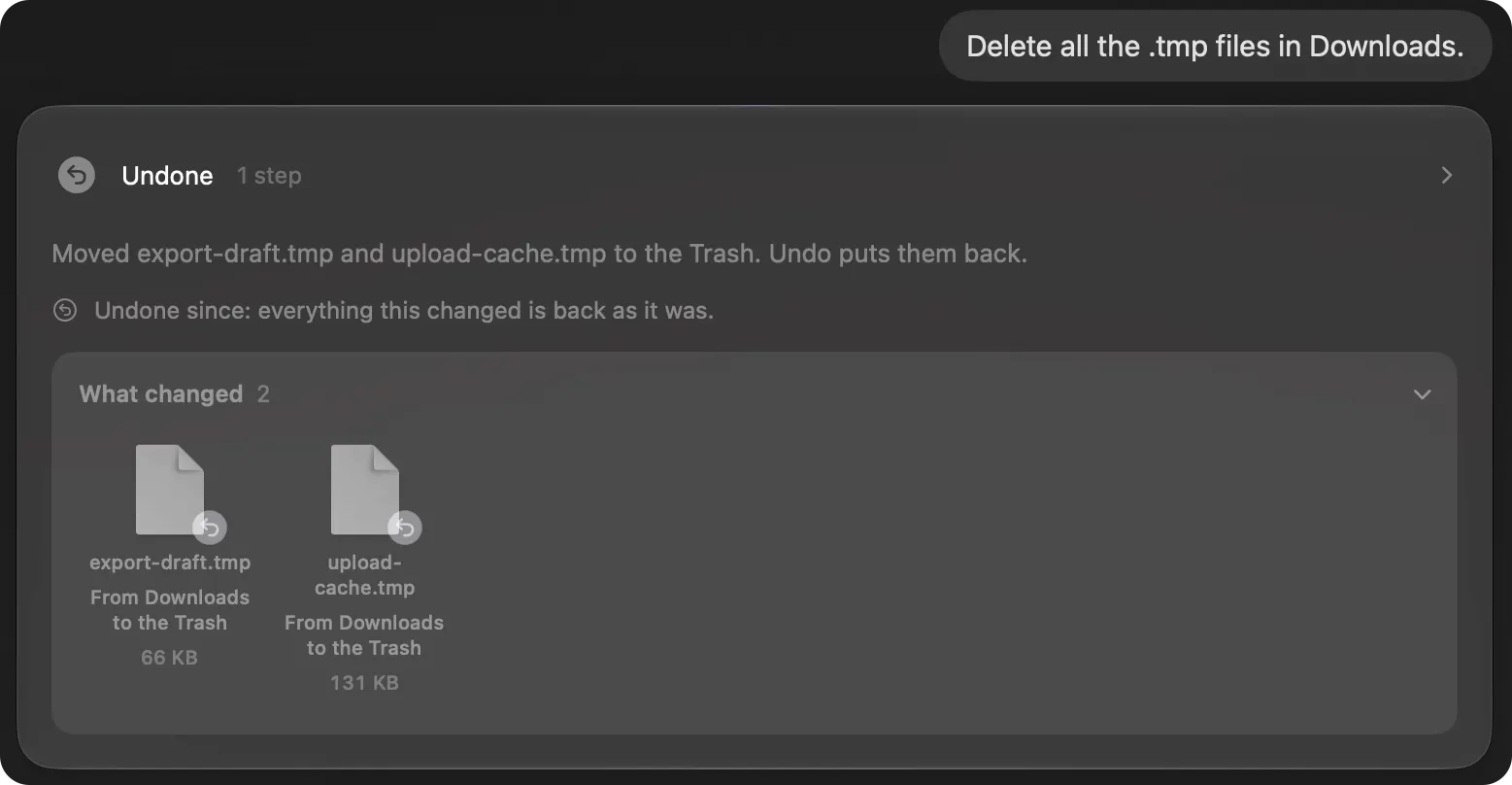
Most apps undo only what you did in them, one step at a time. Brello PI, a Mac app we make, undoes whole requests. After it files your Desktop, makes an expense report or changes three settings at once, its reply has an Undo that puts everything back, and then checks: “everything this changed is back as it was”.
- Files it moved go back where they were.
- Files it deleted come back from the Trash, because Brello deletes only into the Trash, as Finder does.
- Settings return to the values Brello read before it changed them.
- Documents and drafts it made are taken away.
Command-Z works in Brello too. The one thing it can’t undo is emptying the Trash, so it always asks first, saying how many items and how much space.
Checked on macOS 27.0.1, November 2, 2026. Menu names can change with a macOS update.
Sources: Mac keyboard shortcuts (Apple Support); Delete files and folders on Mac (Apple Support); Restore items backed up with Time Machine on Mac (Apple Support).
In Brello’s help: Delete files, and put them back.