We read Rectangle’s home page, its Pro page and its README and license on GitHub on November 26, 2026, and the other apps’ and Apple’s pages the same day. Everything here about Rectangle is from those pages; everything about Brello PI is from its code and the capture on this page.
What Rectangle does
Rectangle’s site puts it in one line: “Move and resize windows in macOS using keyboard shortcuts or snap areas.” Its README says it’s “based on Spectacle”, the window manager it replaced, and its home page calls it “nearly a complete drop-in replacement for Spectacle”.
Snap areas. Drag a window to the edge of the screen and Rectangle shows where it will land. As its README lists them:
| Drag to | The window becomes |
|---|---|
| The left or right edge | The left or right half |
| The top | Maximized |
| A corner | A quarter in that corner |
| The left or right edge, just above or below a corner | The top or bottom half |
| The bottom left, center or right third | That third |
| A bottom side third, then on to the bottom center | The first or last two thirds |
Keyboard shortcuts. Rectangle’s README says the shortcuts are “self explanatory” and lists them in its Settings, on the Shortcuts tab, rather than on the page. Its list of actions, from the same README, runs well past halves and thirds: fourths and three fourths, sixths, eighths, ninths, almost maximize, maximize height, smaller and larger, center prominently, the next and previous display, tile all, cascade, and rows and columns that cycle through grid layouts as you press again.
Pressing again. Repeating a side action cycles sizes, and an option lets windows move across displays on repeated presses, as its README describes. Cycle stacked windows brings forward each window snapped to the same area, and a mouse’s side button can be a shortcut.
Ignore an app. For an app that uses the same keys, choose Ignore app from Rectangle’s menu while that app is in front, and Rectangle lets go of its shortcuts until you switch away.
What Rectangle costs
Rectangle is free. Its site says “Free and Open Source”, and the license on GitHub is MIT, copyright Ryan Hanson. Install it from rectangleapp.com, the GitHub releases page, or Homebrew with brew install --cask rectangle.
Rectangle Pro is a separate, paid app “entirely built on top of Rectangle”, its README says. Its page offers 10 days free, and one license can be active on 3 devices at a time. It adds a window throw to 16 sizes and positions from one key combination, snap areas you place anywhere, your own sizes and positions, workspace layouts that can run when displays connect, stash at a screen edge, pinning an app to a side, next and previous Space, and settings synced over iCloud. Its page says it supports macOS 13.5 and later on Intel and Apple silicon. The price comes from Paddle, its seller, when the page loads, in your currency, so we don’t quote one figure.
Which Macs Rectangle runs on
The README says “Rectangle supports macOS v14+.” For older Macs it keeps two versions: v1.100 for macOS 10.15 to 13, and v0.73 for macOS 10.13 and 10.14. Few apps keep that far back.
Is Rectangle safe?
Its code is public on GitHub under the MIT license, so what it does can be read. Like every window manager, it needs Accessibility to move other apps’ windows: macOS asks once, and you can see or remove it in System Settings ▸ Privacy & Security ▸ Accessibility. If shortcuts stop working, its README’s fix is to turn Rectangle off there, remove it with the minus button, in that order, and allow it again.
Do you need Rectangle on macOS 15 or later?
Since macOS Sequoia, when you drag a window to the screen’s edge, macOS “automatically suggests a tiled position”, as Apple put it. Choose Window ▸ Move & Resize in any app, or hold the pointer over a window’s green button. Apple lists these keys:
| Do this | Press |
|---|---|
| Left or right half | Fn-Control-Left Arrow or Right Arrow |
| Top or bottom half | Fn-Control-Up Arrow or Down Arrow |
| Fill the screen | Fn-Control-F |
| Center | Fn-Control-C |
| Back to the size before | Fn-Control-R |
| Two windows, left and right | Fn-Control-Shift-Left Arrow |
| One window left, the others in quarters | Fn-Control-Option-Shift-Left Arrow |
The four single quarters are in the menu with no key. macOS has no thirds, no move to the next display, and no repeated press that cycles sizes. If halves and filling are all you use, macOS is enough. If you want thirds, display moves or snap areas at the bottom edge, Rectangle is the free way to get them.
Rectangle and the alternatives
| Rectangle | Rectangle Pro | Magnet | macOS tiling | Brello PI | |
|---|---|---|---|---|---|
| Price, as listed | Free, MIT license | Shown at checkout; 10-day trial | $4.99, Mac App Store | Part of macOS | $29.99 for a limited time, then $49.99, once |
| Macs | macOS 14 or later; older versions to 10.13 | macOS 13.5 or later | macOS 13 or later | macOS 15 or later | macOS 14 or later |
| Drag to snap | Yes | Yes, anywhere you place it | Yes | Yes, to edges and corners | No |
| Thirds | Yes | Yes | Yes, along the bottom edge | No | Yes |
| Move to the next display | Yes | Yes | Not listed; supports up to six displays | No | Yes |
| Layouts of several windows | Tile, cascade, rows and columns | Workspace layouts | Not listed | Pairs and quarters | No |
| Beyond windows | No | No | No | No | A launcher, clipboard, snippets, Mac health, an agent |
Raycast’s free plan also has window management, with halves, thirds, fourths, quarters, sixths, displays, Spaces and layouts of up to eight windows, inside its launcher; see Raycast and its alternatives. Our Magnet page covers the paid one-time option.
Brello PI’s window commands
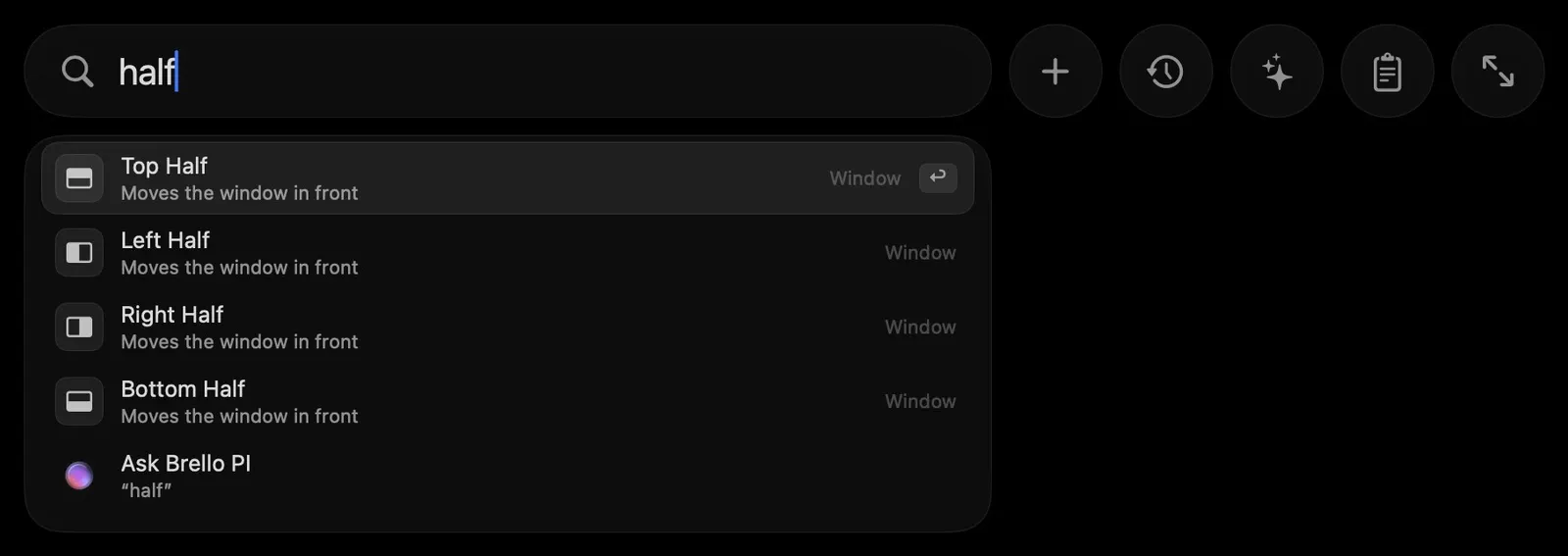
Brello PI isn’t a window manager, and it doesn’t replace Rectangle for someone who lives in snap areas. Its bar, opened with Option-Space, has window commands beside its launcher: left, right, top and bottom halves; first, center and last thirds; first and last two thirds; the four quarters; center; maximize; next and previous display; and restore. Type “half” and the bar lists the four halves, as in the capture.
Once you turn window keys on in Settings, each has a key: Control-Option with an arrow for the halves, D, F and G for the thirds, E and T for two thirds, U, I, J and K for the quarters, C to center, Return to maximize, Control-Option-Command with an arrow for the next or previous display, and Delete to restore. Brello PI holds none of them until you do, so they don’t take keys another app already uses. It moves the window in front through Accessibility, which macOS asks for once.
What it doesn’t have: snap areas, fourths, sixths, cycling on repeated presses, or layouts. If you want those, keep Rectangle; the two can run together as long as their keys don’t overlap.
Where Rectangle is the better choice
- It’s free and does windows completely. Drag, keys, cycles, stacks, displays and grids, at no cost.
- Older Macs. Versions back to macOS 10.13 are still offered.
- You only want windows. It does one job and nothing else.
Where Brello PI helps
- One bar for windows, apps and the rest. The same Option-Space opens apps, clipboard history, snippets, a calculator and Brello’s commands, such as What’s Slowing My Mac and Free Up Space.
- An agent for the work behind the windows. Ask it to tidy a folder or find a file by what you remember, on Apple’s on-device model, with Undo.
Questions
Can I move my Rectangle settings to another Mac?
Yes. Since v0.44, its README says, the import and export buttons on the App Settings tab save your settings and shortcuts as a JSON file to open on the other Mac.
Can I run Rectangle’s actions from a script or Shortcuts?
Yes, through its URL scheme. From Terminal, its README’s example is open -g "rectangle://execute-action?name=left-half", and any action it lists works the same way, such as next-display or tile-all. A second form, rectangle://execute-task?name=ignore-app, ignores or unignores an app, by its bundle identifier if you add one.
Does Rectangle work on macOS 27?
Its README says it supports macOS 14 and later, with no upper limit stated. Its home page says the same, “Supports macOS 14+.”
Can Rectangle use Spectacle’s shortcuts?
Yes. Its home page says Spectacle’s default shortcuts can be chosen when Rectangle first runs, and its README notes that repeating first third or last third cycles through the thirds, as Spectacle did.
How do I uninstall Rectangle?
Quit it and move it to the Trash, then run defaults delete com.knollsoft.Rectangle in Terminal to clear its settings, as its README says. If you installed it with Homebrew, brew uninstall --zap rectangle does both.
Trademarks
Rectangle and Rectangle Pro are made by Ryan Hanson. Magnet is sold by BOOTCODE A.S. Raycast is a trademark of Raycast Technologies Ltd. macOS is a trademark of Apple Inc. Brello PI, a product of Stuvio, isn’t affiliated with or endorsed by any of them. Names and prices as read on November 26, 2026.
What you need for Brello PI
The bar and its window commands work on any Mac with macOS 14 or later. The agent needs a Mac with Apple silicon, macOS 27 and Apple Intelligence.
We make Brello. What Rectangle does and costs was read from its maker’s own site on November 26, 2026, and may have changed since:
- Rectangle, read November 26, 2026
- Rectangle Pro, read November 26, 2026
- Rectangle on GitHub (README and license), read November 26, 2026
- Magnet (Mac App Store), read November 26, 2026
- Window Management (Raycast Manual), read November 26, 2026
- Tile app windows on Mac (Apple Support), read November 26, 2026
- macOS Sequoia (Apple Newsroom, June 2024), read November 26, 2026