Where people expect help first
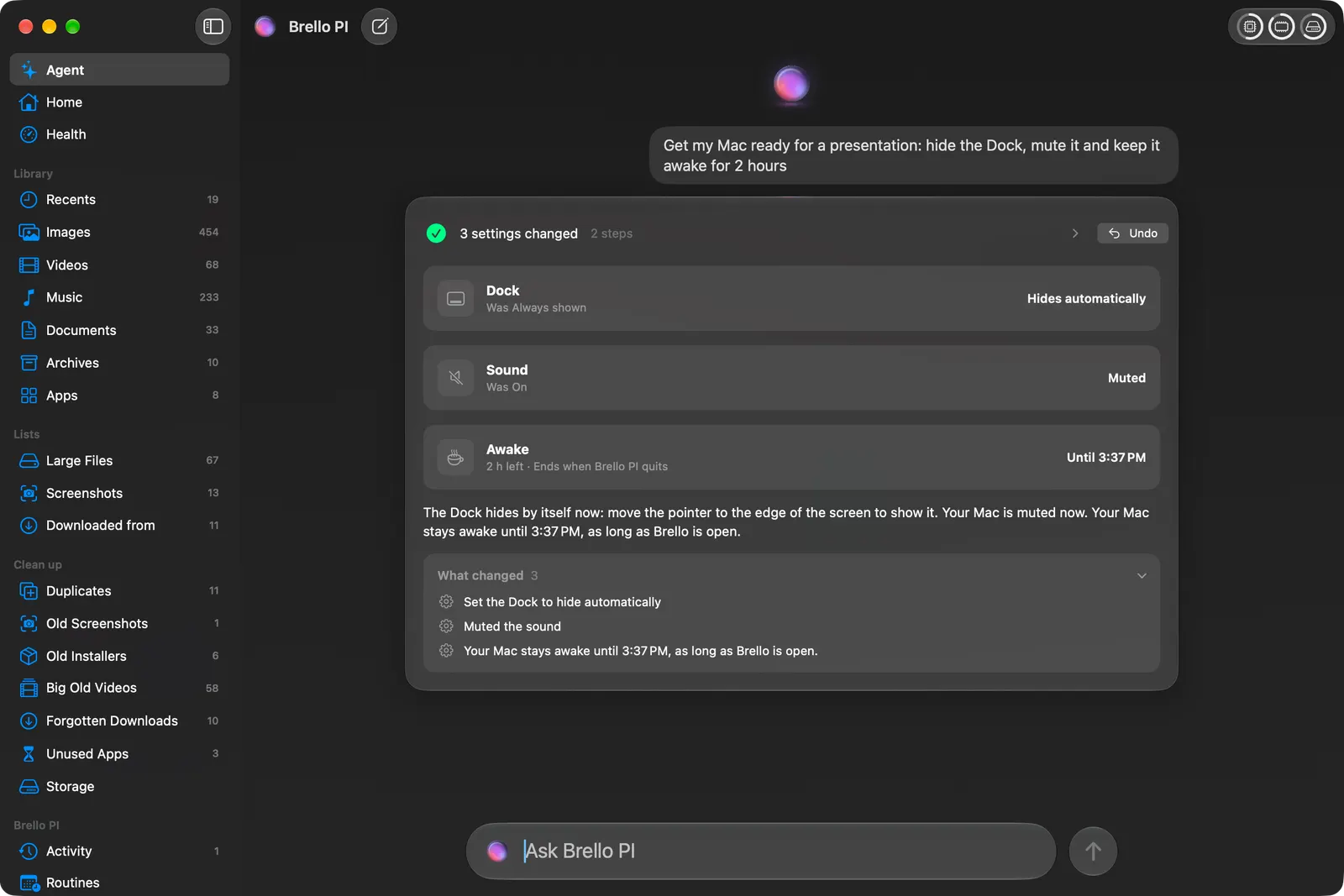
Some of the most ordinary things to ask of a Mac are about the Mac itself: keep it awake through a download, turn the volume down, hide the Dock, go dark at night. Until October 21, Brello PI answered “turn on dark mode” by opening the Appearance pane and saying it didn’t change settings itself. That was safe, and it wasn’t help.
Now Brello PI changes the setting. The work was not in flipping a value. It was in doing it only through mechanisms Apple publishes, proving each change took, never claiming one that didn’t, and keeping a way back from every one.
Read by code
A request about a setting is read whole by code, as apps by name are: which setting, to what, or what to do to the Mac. No model is asked. Of the first-use suite’s 45 requests about settings and power, 44 make no model call at all, and the one that does is a request for files that comes before a follow-up.
- A question is answered, not acted on. “Is dark mode on?” reads the Mac and says. “How do I turn on dark mode?” gets one line, “I can turn on Dark Mode for you,” with a Turn On button; nothing changes until it is pressed, or until you say yes.
- What is missing is asked. “Change the volume” asks to what level. “Keep my Mac awake until the meeting ends” asks for how long, because code can’t know when a meeting ends and doesn’t guess.
- What the turn before found carries. After a search for photos, “make the first one my wallpaper” uses that photo.
- A download in progress counts. “Until this download finishes” watches the newest partial file in Downloads, from Safari, Chrome or Firefox. With none, Brello PI says so and asks how long.
Public mechanisms, each read back
Every mechanism was read in the macOS 27 SDK’s headers and in the scripting dictionaries on the Mac before it was used, then probed by reading only.
| Setting | How | Read back from | Undo |
|---|---|---|---|
| Keep the Mac awake | An IOKit power assertion with the system’s own timeout | The assertion’s own properties | Released, or kept awake again for what was left |
| Dark and Light | System Events’ appearance preferences | The system’s appearance preference | Set back |
| Volume and mute | Core Audio, on the default output device | The same properties | Set back |
| Wi-Fi | CoreWLAN | The interface’s power | Set back |
| Wallpaper | NSWorkspace, on every display, its options kept | Each display’s picture | The picture before |
| The Dock | System Events’ Dock preferences: hiding, size, magnification, position | The Dock’s preferences | Set back |
| Finder’s views | Finder’s preferences, then Finder started again in the background | The same preferences | Set back |
| Screenshots | Where they are saved, and their format | The same preferences | Set back |
| Default browser | NSWorkspace, with macOS’s own question to you | Which app opens web links | Set back, macOS asking again |
| Sleep, restart, shut down, log out | IOKit and System Events, after your yes | — | None: an act |
| Empty the Trash | Finder, after a question that says how many items and how much | Finder’s count | None: deleted for good, and said first |
Two choices are worth explaining. Dark and Light go through System Events, Apple’s own scripting, because writing the preference directly changes no app that is already open. And locking the screen: macOS has no public call that locks it, so where the displays’ sleep locks at once, Brello PI sleeps the displays; where it doesn’t, Brello PI posts the system’s own Lock Screen shortcut. It is the one key Brello PI posts anywhere, from one reviewed file, held to that one shortcut by a test.
Saying only what macOS reports
Every change is read back from the system after it is made, waiting a moment where the system takes one, as the Dock and Finder do. The reply says what the system reports, not what Brello PI asked for. A change that didn’t take is said plainly: Brello PI asked macOS to hide the Dock automatically, macOS still reports it always shown, so it didn’t take, and anything Brello PI moved on the way is put back.
A setting that is already as asked is said so, and nothing is changed or recorded for Undo. Then the kernel reads each change a second time, through the tool’s own second channel, before the reply calls it done. Undo puts back the value Brello PI read before, and says what it put back: “Put the appearance back to Light.”
What acts at once, what asks
Reversible settings act at once, as opening an app does, and each is recorded for Undo. Power and the Trash are destructive in Brello PI’s tiers: sleep, restart, shut down, log out and emptying the Trash ask first, and the Trash’s question says how many items and how much space. With nobody at the Mac, in a routine or an automation, those wait for you; a reversible setting is still done, as a routine’s file moves are.
If you turn off Brello PI’s control of apps and settings in Settings, none of these tools exists in that run.
What no app may change
macOS keeps some settings for itself, and Brello PI doesn’t reach around it. For each of these it opens System Settings at the exact pane, with one sentence on what to do there, and never says it made the change.
- Brightness, True Tone and Night Shift
- Bluetooth
- A Focus or Do Not Disturb
- The accent color and Auto appearance
- Notifications
- The firewall
- FileVault and apps’ access
- Passwords and Touch ID
- Login items
- The keyboard, trackpad and mouse
- The Mac’s sleep timers
Some of these an app could change with private calls or by pressing keys in System Settings on your behalf. We chose not to: a public mechanism either works or says it failed, and a private one can break with any update and say nothing.
Tested without touching our Mac
We never change the settings of the Mac we build on, not even in a test. Every system effect is behind one interface. The product uses the real Mac; a sandbox, the first-use suite and every test use a made-up Mac with the settings people have, which records what it was told. On the Mac we build on, the only change any probe made was a four-second power assertion, let go by the system’s own timeout and checked with macOS’s own pmset.
On that made-up Mac, the 38 settings and power cases of the first-use suite pass on the command line and in the window, and the product’s own tests change a setting, read it back, undo it, put back a change that half took, and hold power and the Trash to their questions. What a made-up Mac can’t show is macOS itself changing. That is the job of a separate check, sixteen steps played by a person in a macOS user set up for testing, which change each setting, read it back with macOS’s own tools, and read it again after Undo.
Limits
- Wi-Fi on a standard account. macOS asks for an administrator to turn Wi-Fi off only when a Mac is set to require it. If it doesn’t turn off, Brello PI says so.
- The default browser is changed through macOS’s own question, which you answer.
- Keeping awake ends when Brello PI quits. That is macOS’s rule for an app’s power assertion, and the reply says so.
- Where the agent runs. Settings are changed by code, with no model in the way, but you ask for them in the Ask bar, which takes words only on a Mac where the agent runs. On any other Mac, the Agent page says what that Mac needs.
Notes and sources
- Apple’s documentation: IOPMLib (power assertions), Core Audio, CoreWLAN and NSWorkspace.
- The first-use suite and its two paths are in The first ten minutes; the risk tiers in Undo everything.
- Built and measured October 21, 2026, on an iMac with Apple M4 running macOS 27.0.