Policy and structure
A privacy policy says what a company has decided to do with what you give it. The software’s structure decides what it is able to do. We make our promises in the structure, because a policy can change after you have shared something, and a structure can be checked by someone other than us.
Brello for Mac reads your requests and your files on your Mac, with its own code and Apple’s on-device model. It has no account. It sends no analytics and no crash reports, and it never uses Apple’s cloud model. Most requests never touch the network at all. For the ones that must, a place on Apple Maps or a fact from Wikipedia, three rules hold.
One module may reach the network
Brello is built from modules, and each depends only on a shared set of contracts, never on another module. One of them, BrelloEgress, holds every line of network code in the product: the broker every request goes through, the ledger, the guard that reads each query before it leaves, the page reader, and the sources. It is also the only module that may import Apple’s frameworks for maps, weather and location.
A rule like that is only as good as its enforcement, so a set of privacy tests reads every source file on every build and fails the build when the rule is broken.
| The test | What it reads for |
|---|---|
| Networking code appears only in the egress module | Every source file is read whole, comments and strings told apart from code, and any way of opening a connection outside BrelloEgress fails the build. |
| The internet’s frameworks are imported only there | MapKit, WeatherKit and CoreLocation may be imported by BrelloEgress alone. |
| The update check and the license check go through the broker | Neither may reach the network any other way. |
| The index has no way off the Mac | The private index and its encoder make no request, and their vectors stay in the index. |
| Apple’s cloud model is named nowhere | No file may name it, so no file can use it. |
| Image Playground’s outside service is named nowhere | Images are made in Apple’s animation, illustration and sketch styles, on the Mac. The style that hands words to another company may not appear in the code, even in a comment. |
| The scan is tested too | It must catch every kind of networking it is meant to, leave ordinary local code alone, tell comments and strings from code, keep reading past a regular expression, and finish every real file it starts. |
One honest qualification. Brello is a direct download, signed with Developer ID and notarized by Apple, and it runs without the App Sandbox. So macOS itself doesn’t stop another part of Brello from opening a connection. What stops it is the structure, the test that reads every file, and the ledger below, which you can compare with any network monitor.
The ledger
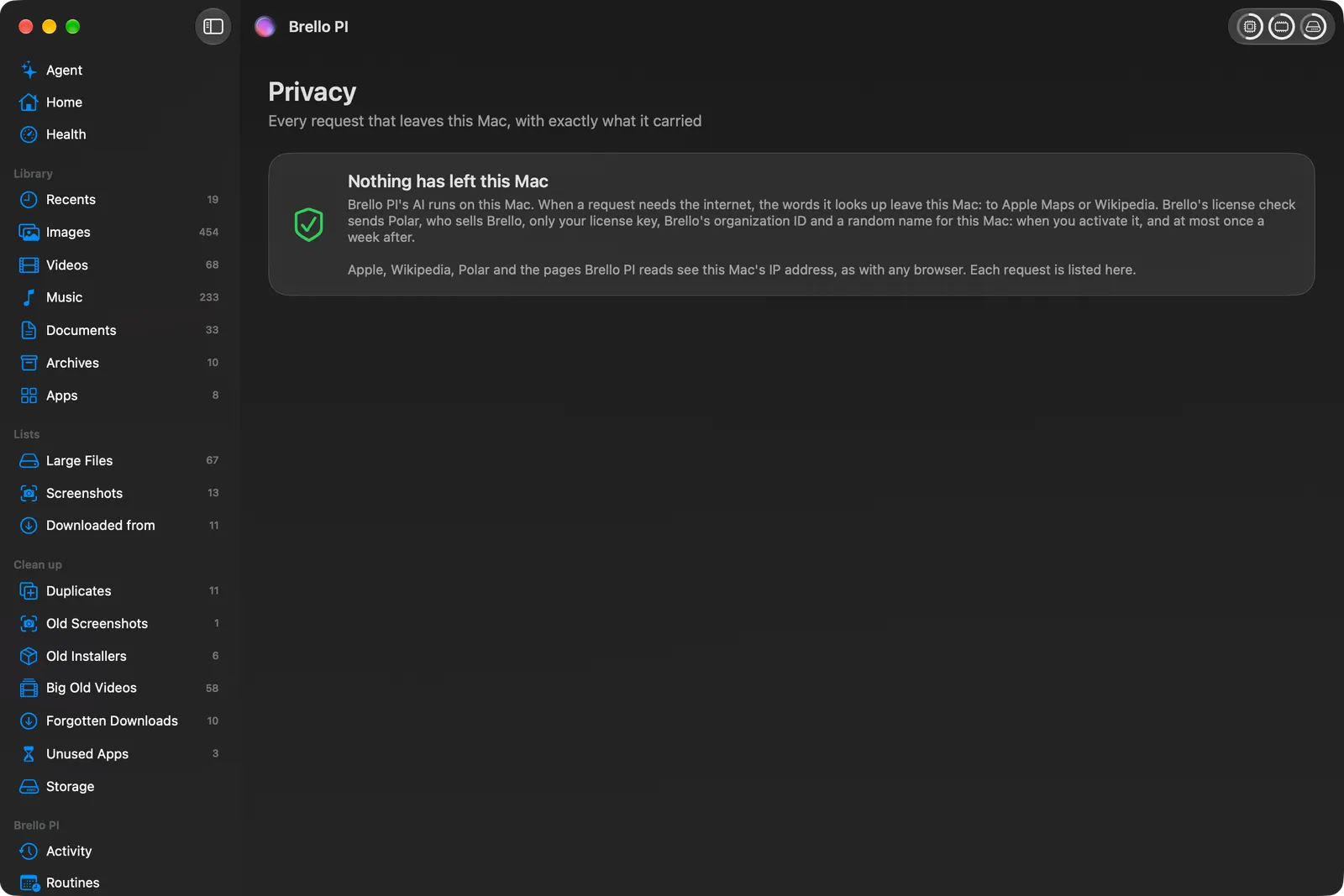
Every request to any source, Apple’s included, is written to a ledger on the Mac before it leaves, and again when it ends. If the line can’t be written, the request isn’t made. The ledger is the Privacy page in the app: where each request went, when, and what it carried.
Apple’s maps and weather frameworks open their own connections, which Brello can’t see inside. So Brello writes those requests around the call: the service, the call made, what was handed over and how it ended. It doesn’t know their byte counts, and the ledger says so rather than showing a zero.
What a request carries
A value that leaves the Mac is filled only from words you typed. There are two exceptions, both narrow. A web address that this run’s own search returned may be opened as it stands. And a place that this run’s own Apple Maps search returned is sent back to Apple Maps for its Look Around photo: its name and position, never your words.
| When | What is sent | To |
|---|---|---|
| A request needs places | The words you typed | Apple Maps |
| The map, and a Look Around photo of each place | Each place Apple Maps returned: its name and position, never your words | Apple Maps |
| A question about a person, place or thing, or a research brief | The words you typed | Wikipedia, or Wikidata |
| The article’s picture | The picture’s address, taken from the article | Wikimedia’s own servers |
| A research brief | Ordinary requests for the articles its lookup found | Wikipedia |
| The license check | Your license key, Brello’s organization ID and a random name for your Mac | Polar |
| An update check, if automatic updates are on | “Brello” and its version | Brello’s update server |
Before a query leaves, a guard reads it, and refuses one that holds an email address, a file path, your user name, a long number, or anything shaped like a password. The names of files you choose in Home never leave. Apple Maps is asked in plain words with no region attached, so nothing about where your Mac is goes with the search. Wikipedia is asked through the Wikimedia Foundation’s official APIs, with a User-Agent that names Brello, as its policy asks.
Whether a request needs the internet at all is decided by code, from the request’s own words, never by a model’s guess. A question about your own files, notes or folders stays on the Mac even if the model would have sent it out, unless you ask to look online.
Asked once
The first time a request needs the internet, Brello asks, through the kernel’s own approval: exactly what will leave, where it will go, and who will see your Mac’s IP address. You answer Allow or Don’t Allow. The answer is kept, and Settings changes it.
We say who sees the address because we can’t hide it. iCloud Private Relay covers Safari, DNS and unencrypted traffic from apps, not an app’s encrypted requests, so each service sees your IP address as it would from a browser. The question names it instead of implying otherwise.
A routine runs with nobody at the Mac, and then nothing goes online at all. A request that would go online waits until you are there.
The license check
Payments for Brello for Mac are processed by Polar Software, Inc. Brello holds no Polar secret. It calls only Polar’s three public license-key endpoints, through the same broker and into the same ledger, and each call carries your license key, Brello’s organization ID at Polar, and a random name made on your Mac. It checks at most once a week, and only while Brello may use the internet. When Polar can’t be reached, Brello keeps working; a license ends only on Polar’s own answer that it has.
What stays on the Mac
- Your requests, read by Brello PI’s code and Apple’s on-device model.
- Your files, read, searched and changed where they are.
- The private index, if you turn it on: one file in Brello’s own folder, left out of backups, made only from the sources you switch on. Erase, in Settings, removes it.
- Images you make, by Apple’s Image Playground on the Mac.
- Brello PI’s own records: the ledger, the undo records, your routines and settings, and Health’s record of your Mac’s readings. Your license key is kept in your login keychain.
None of it reaches us, which is also why there is nothing of it for us to hand over, sell or lose.
What this doesn’t cover
- The services you allow. Apple Maps, Wikipedia and Polar each receive what Table 2 says, with your IP address, and handle it under their own policies.
- Apple’s frameworks. Which hosts MapKit reaches is Apple’s, and not something Brello can see.
- Email you send. Brello PI writes a draft that Mail opens. Once you send it, it travels as any email does.
Notes and sources
- Apple, About iCloud Private Relay: what Private Relay covers.
- Wikimedia Foundation, User-Agent Policy.
- Polar’s license keys are checked through its customer-portal endpoints for activating, validating and deactivating a key. Brello’s privacy policy lists each request in full: Privacy policy.
- How code decides whether a request needs the internet, and which source fits, is in Code first, model second.