A Mac with Apple silicon has two kinds of cores: performance cores for what you’re doing, and efficiency cores for work that can wait. macOS decides where each thread runs, and it decides well, but it can’t know that the export grinding in the background matters less to you than the call in front. Balance the load tells it, for your own processes only, and takes it back when you say so.
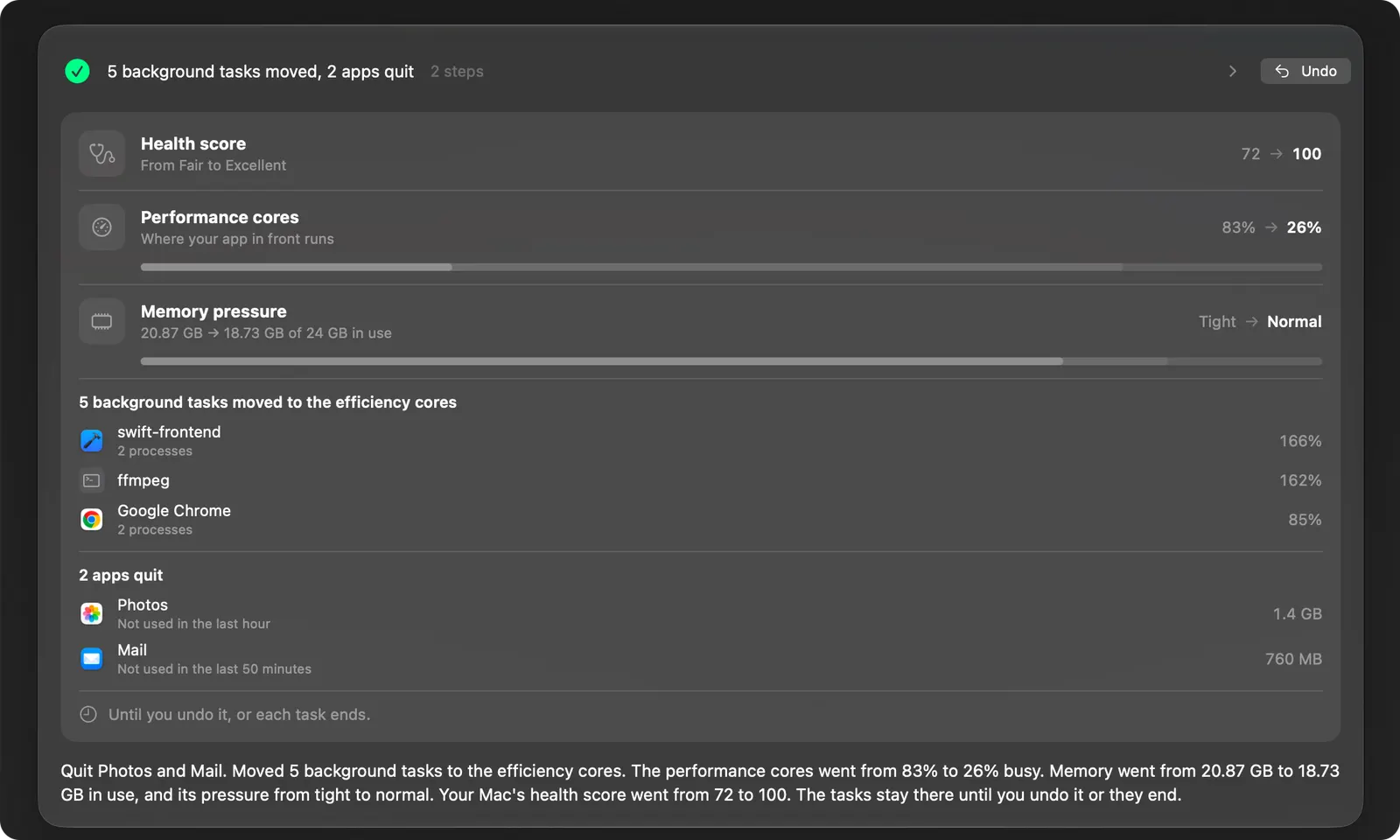
Read from the words
“Balance the load on my Mac”, “load balance my Mac” and “free up some RAM” are read whole by code, as apps and settings are, and no model is asked what kind of request it is. The words decide the scope: balancing moves the work and offers to quit apps only when memory is tight; freeing memory offers to quit and moves nothing; “without closing anything” moves the work and asks nothing. A question about the Mac’s health, the disk (“free up space”) and anything that isn’t the Mac (“balance my checkbook”) are left to their own answers. A question about the Mac’s health is answered from the readings, and offers to balance the load where it would help.
One public call
Moving a process into the background is one call macOS documents: setpriority with PRIO_DARWIN_PROCESS and PRIO_DARWIN_BG, which, in the header’s words, “lowers CPU, disk IO, and networking priorities.” We tried it first on a process of our own probe: two busy threads on an iMac with six efficiency and four performance cores. At its usual priority it took the performance cores from 32% to 81% busy. Set to the background, they fell back to 31%, its work gone to the efficiency cores. Set back, they rose to 80% again. Its task’s base priority went from 12 to 4 and back to 12.
Undo is the same call with the priority set back to 0, read back the same way. Nothing else changes: no setting, no file, no other process.
The read-back that lied
Brello says only what it can read back, so the obvious check was getpriority on the same process. It answered 0 every time: for our probe after the change had plainly worked, and for all 517 processes we could read while a background build ran. It never reports another process’s background state. The read-back is the kernel’s own task information instead (proc_pidinfo, its task priority at 4 or below), which moved as the cores did.
A process id can be reused once a process ends, so every change first checks the process’s start time against the reading it was chosen from. A new process that happens to have the same id is never touched.
What is moved, and what never is
Code chooses, from a fresh reading. Moved: your own processes that used at least a fifth of a core over the reading and aren’t in the background already, busiest first, at most twelve: renders and exports, builds, a browser’s busy helpers. Never: another user’s or the system’s processes, anything that runs from macOS’s own folders, a closed list of macOS’s parts by name (WindowServer, the Dock, Finder, Spotlight’s workers and some forty more), Brello itself, and the app in front with every process inside it, so a build you’re watching in Xcode keeps its cores.
Quitting asks first
Under memory pressure, Brello can also offer to quit apps: in the Dock, not in front, holding at least 500 MB with their helpers, not used for 30 minutes as far as Brello has seen, and not at work (playing, downloading, or busy on the processor). At most four. The question names each one, says why (“Memory is tight: 20.87 GB of 24 GB is in use. You haven’t used these in the last 50 minutes, and together they hold 2.14 GB.”), and quits them politely, so each saves your work or asks, as when you quit it yourself.
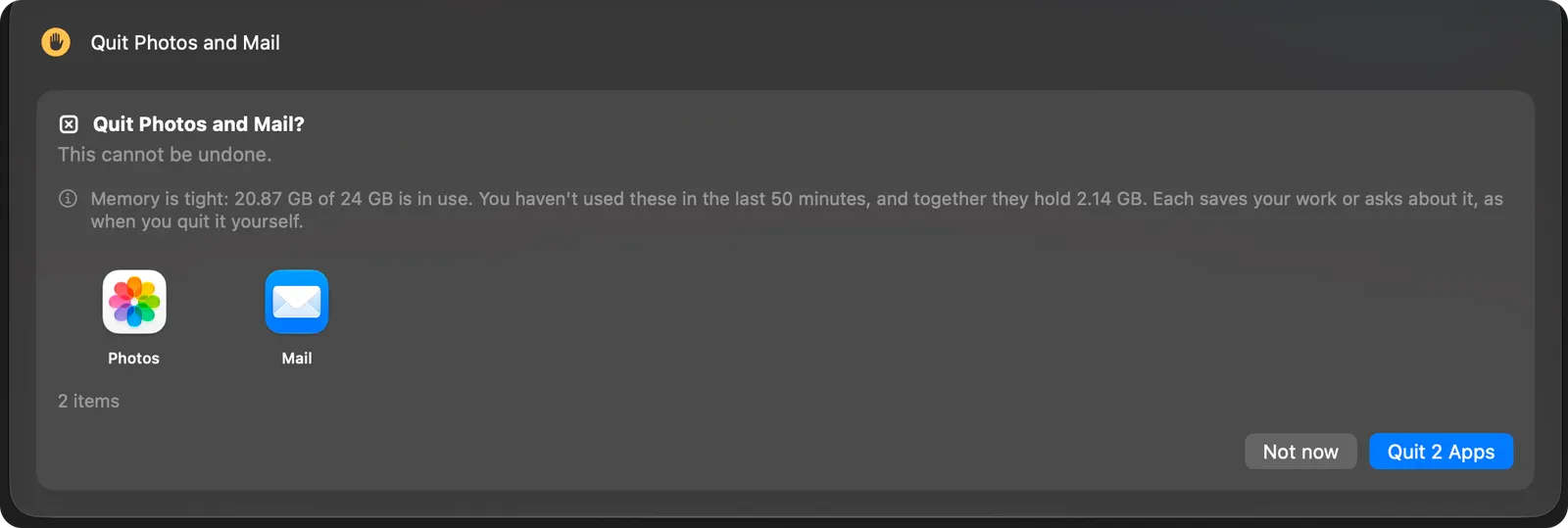
“Unused” is never more than Brello PI saw: an app it has no record of is never offered. With nobody at the Mac, as in a routine, quitting is never asked and never done.
Saying only what happened
A task counts as moved only once macOS reports it in the background. One macOS kept as it was is said so; one that ended is left out. The card’s “after” is a second reading taken after the moves, and a drop is claimed only where there is one. When there’s nothing worth moving, the reply is one plain line: “Your Mac is balanced: nothing in the background is using much.” Moves last until you undo them or each task ends, and the card says that too.
Limits
- Everything here was proven on a stand-in process table and on our probe’s own process. Nothing in a test moved a real process of ours or quit an app; the effect on a real day’s work is the first click of whoever uses it.
- On an Intel Mac there are no efficiency cores, so the card shows the processor as a whole.
- A quit app can’t be un-quit. Undo puts every task back and offers to reopen the apps it closed.