What Home is
Finder shows you folders. Home shows you what you have: every image, video, song, document, archive and app on the Mac, counted and sized, with lists for what you might clear out and a search that reads a sentence. It is read from the same index macOS keeps for Spotlight, on the Mac, and changes nothing until you ask.
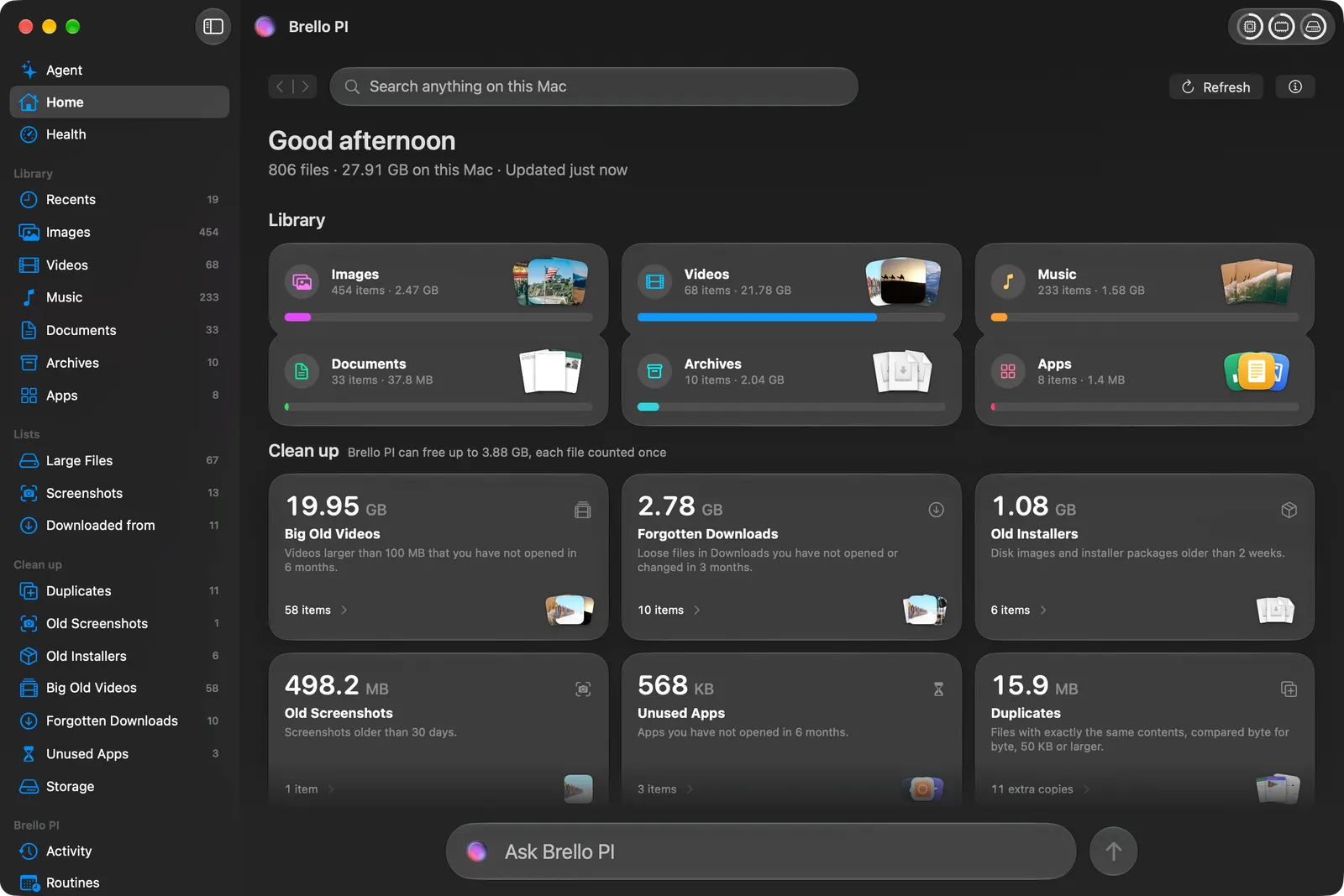
Half the rows aren’t yours
Spotlight indexes everything, and on a developer’s Mac most of everything isn’t the person’s. On ours, 131,492 rows answered “images.” Thirty-two thousand were inside ~/Library, among them a one-terabyte disk image of Docker’s that the extension .raw made a camera raw photo. Another 32,000 were in node_modules. TypeScript’s .ts files are typed as MPEG transport streams, so the same Mac held 144,000 “videos,” none of them with a length.
So Home keeps a scope of what is yours: the home folder and the apps, never ~/Library except iCloud Drive, nothing hidden, nothing inside a package, nothing under build output or dependency folders. A transport stream counts as a video only if it has a length.
Spotlight’s rows and what Home shows, by kind
One developer’s Mac, a release build reading only, October 14, 2026 (log scale)
Figure 2 as a table
| Kind | Spotlight’s rows | Shown in Home |
|---|---|---|
| Images | 131,492 | 41,432 |
| Documents | 48,868 | 7,719 |
| Archives | 8,579 | 92 |
| Videos | 1,013 | 956 |
| Music | 369 | 297 |
| Apps | 35 | 18 |
Search by sentence
Type what you remember, “the contract I signed in March,” and Home reads it into parts you can see: a kind, a date, a size, a source, the words to look for inside. Rules read most sentences: comparisons and units for sizes; today, last week, March, “the past three months,” “before 2024”; which date is meant, opened or taken or downloaded; negations like “haven’t opened in a year.” On average a sentence takes the rules 33 microseconds.
Apple’s on-device model is asked only when the rules leave words that say more than names, and its answer is checked field by field before any of it is used. A kind needs a word of the sentence behind it. A time or a size must be said in the sentence. A source is taken only when the sentence names it. When the model called “that lease agreement my landlord emailed me” a document, a kind nobody said, the answer was refused, and so was “tax” offered as a kind.
| Sentence | Read by | Time | Understood as |
|---|---|---|---|
| “pdfs from last week over 5 MB” | Rules | under 1 ms | PDFs · Last week · Over 5 MB |
| “screenshots from this month” | Rules | under 1 ms | Screenshots · This month |
| “the huge keynote I haven’t touched in a year” | Rules | under 1 ms | Keynote presentations · Not touched in a year · Over 1 GB |
| “clear out installers I grabbed off github ages ago” | Model, checked | 1.8 s | Installers · Older than a year · From GitHub |
| “the tax stuff my accountant sent ages ago” | Model, checked | 1.7 s | Older than a year · Words: tax |
Saved to the sidebar with Command-S, a search keeps its words, never its files, and runs again whenever it is opened.
Duplicates, proven
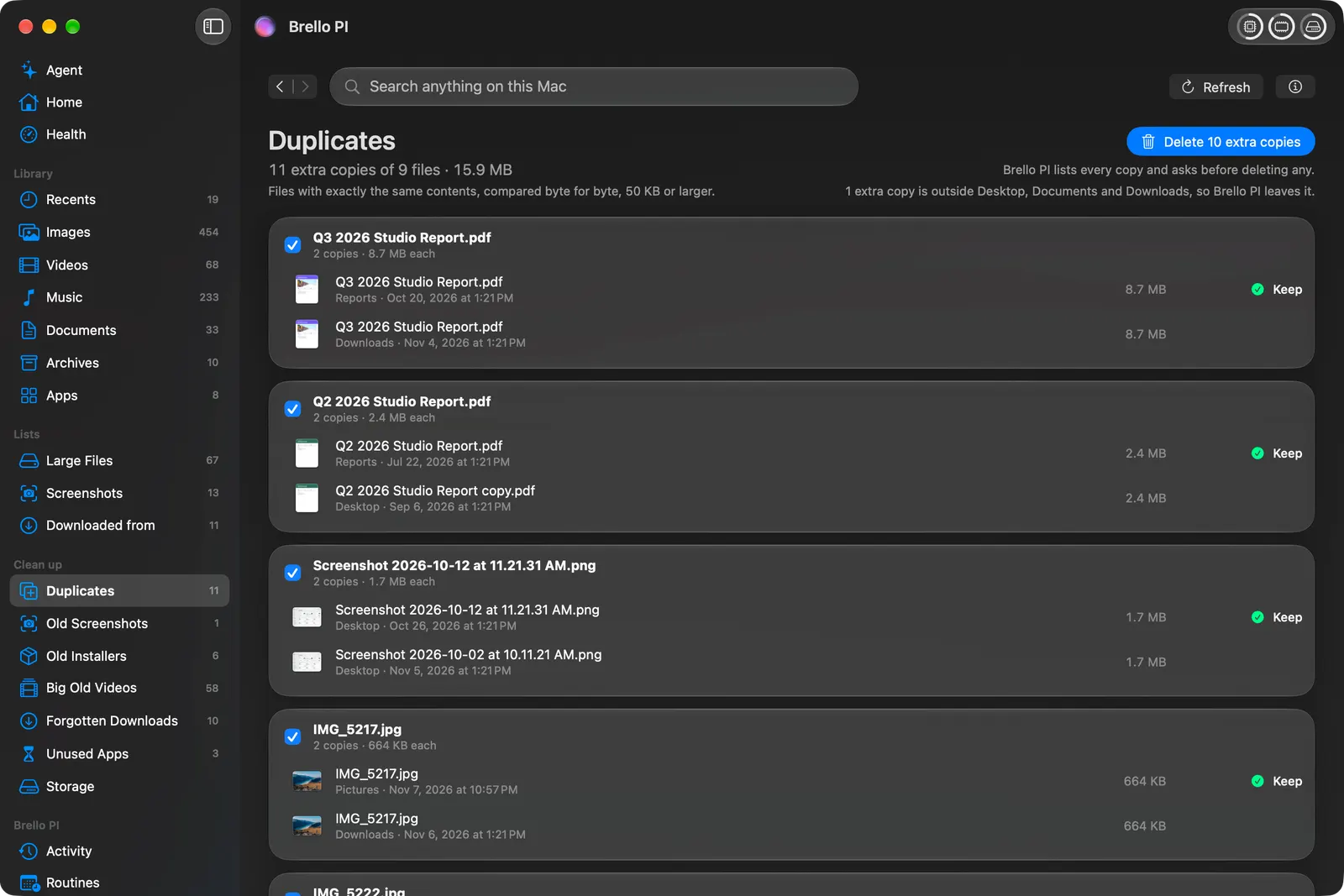
Two files are duplicates in Home only if their bytes are the same. Files of the same size are compared by a SHA-256 of three 16 KB samples, then by a full SHA-256. Hard links are one file. Full APFS clones are one family, because deleting a clone frees nothing, so Home never offers one as an extra copy. A file whose contents are only in iCloud is never opened to compare it.
The first look on our home took 39 seconds; after that it reads from its own cache in 1.9. It also taught us what not to offer. Before build folders were left out, it found 13.9 GB in 7,223 copies, nearly all of them build output: the same 165 MB library in six projects. Offering to delete one would have broken a build. With build output left to the Storage page, where a clean build frees it, the duplicates were 2.71 GB in 4,499 copies, all of them ones a person had made.
Looking alike is a different question, and Home doesn’t treat it as a duplicate. Where it matters, in an expense report, Brello PI uses Apple’s Vision feature prints: the same receipt photographed clean and tilted measured a distance of 0.18, two different screenshots 0.63, a document against a photo more than 1.0. A receipt photographed twice is counted once only when its print is close and code also finds the same total and the same date.
Where a download came from
macOS records the address a download came from. Downloaded From groups your files by site: Gmail, Google Drive, a store, a government site. The page a file was downloaded from wins over the server that stored it, so an attachment served from a Google storage host is filed under Gmail. On our Mac, 288 of 289 downloads found a group; the one left had recorded only a file address.
As you type
Press Option-Space in any app and start typing. Files appear as you type, by name, by Finder tag, and by the words inside documents. Each letter asks Spotlight for at most 4,000 files within two seconds and keeps the best seven by Home’s own order. A word typed fast is looked for once, and an older answer never lands over a newer one.
Spotlight doesn’t read the words in screenshots: macOS’s own importer found 67 attributes on a test screenshot and none held its text. So with the private index on, Brello reads pictures and scans itself with Apple’s Vision, on the Mac, and Quick Search finds a screenshot by what it says.
A window that holds still
On October 19 we found the app choppy. Sitting still, Brello took about a third of the processor, measured on a debug build, and macOS’s WindowServer, which draws everything on the screen, 27%. Three causes: the toolbar’s rings eased after each reading with a spring that, on a busy Mac, never came to rest; the Library listened for file changes across the whole home folder, so every cache an app wrote woke it; and the vitals swept every process every two seconds whether anyone was looking or not.
The fixes were small and specific. The rings now move only for a change of 2% or more, and stop. The Library listens only to the folders it shows, and a burst of changes becomes one signal, backing off while a build keeps writing: ten minutes of a file written every second now signals 13 times where it would have signaled 40. The busiest processes are swept only while the Health page shows them.
Processor time, before and after
Each process’s own share over 60 seconds, a release build on 2,500 made-up files, October 19, 2026
Figure 4 as a table
| Scenario (60 s) | Brello before | Brello after | WindowServer before | WindowServer after |
|---|---|---|---|---|
| The Agent page at rest | 6.5% | 0.9% | 18.1% | 2.7% |
| At rest, while a build moves the processor figure | 8.6% | 0.9% | 23.6% | 2.1% |
| Home, while files change in a shown folder | 3.9% | 1.3% | 11.7% | 5.6% |
| The Agent page behind other windows | 1.5% | 1.2% | 2.0% | 3.7% |
| Scrolling Home’s Desktop page | 12.7% | 5.9% | 17.9% | 3.1% |
| Scrolling the Images page | 20.5% | 10.0% | 23.8% | 9.9% |
| Scrolling a thread of answers | 20.3% | 11.3% | 23.2% | 9.8% |
Scrolling was never where the choppiness was. Across all three scrolling tests, every hitch before and after was a single frame of 17 milliseconds, and fewer than one frame in a hundred. With the rings at rest, the window now draws nothing for seconds at a time.
The Health page had its own problem: it moved. Read frame by frame from a capture, its list of what is using the most came in 8 orders in 21 frames. Now its five rows keep their processes, a process passes another only when it is busier by 5 points of one core, and every changing figure has a slot as wide as the widest it can be. A test lays the page out with a quiet Mac’s readings and then a busy one’s, and holds 33 parts to the same place.
What it doesn’t do yet
- Similar photos. Home’s duplicates are byte for byte. Photos that only look alike are not found as duplicates.
- A first look on a very large home takes time. On ours a cold summary took about nine seconds. Home opens on the last one at once and reads again behind it.
- Words in screenshots need the private index. It is off until you turn it on.
Notes and sources
- The counts and timings of Figure 2, Table 1 and the duplicates were read from the development Mac’s own home folder, an iMac with Apple M4, 32 GB and a 1 TB SSD, with nothing changed; other builds ran on the Mac at the same time, so the timings carry their load.
- Figure 4’s method: each process’s CPU time over a 60-second window (ps), a release build with development options compiled in, opened in the background on a sandbox home, the window held in view, the run stopped if a key or the mouse was touched. Hitches from Instruments’ SwiftUI template, counted only while the wheel turned.
- Apple’s documentation: Vision (feature prints, text recognition) and MDItem (Spotlight’s metadata).