At a glance
| Spotlight | Brello | |
|---|---|---|
| Best for | A file whose name or a word in it you know | A file you only half-remember |
| How you search | Words, and operators such as kind:pdf |
A sentence: kind, date and words read from it, and shown |
| Saving a search | A Smart Folder in Finder | ⌘S saves it to Brello’s sidebar |
| Words in screenshots | Not kept: none of the 67 attributes Spotlight stored for a screenshot held its words, in our measurements | Read with Vision on your Mac, with the agent’s private index on |
| Where a download came from | Get Info, one file at a time | Downloaded From, every download by site |
| Apps, contacts, the web | Yes | Files |
| Cost | Built in | $30 at launch, then $50, one time |
The same searches, side by side
| You remember | In Spotlight or Finder | In Brello’s Home |
|---|---|---|
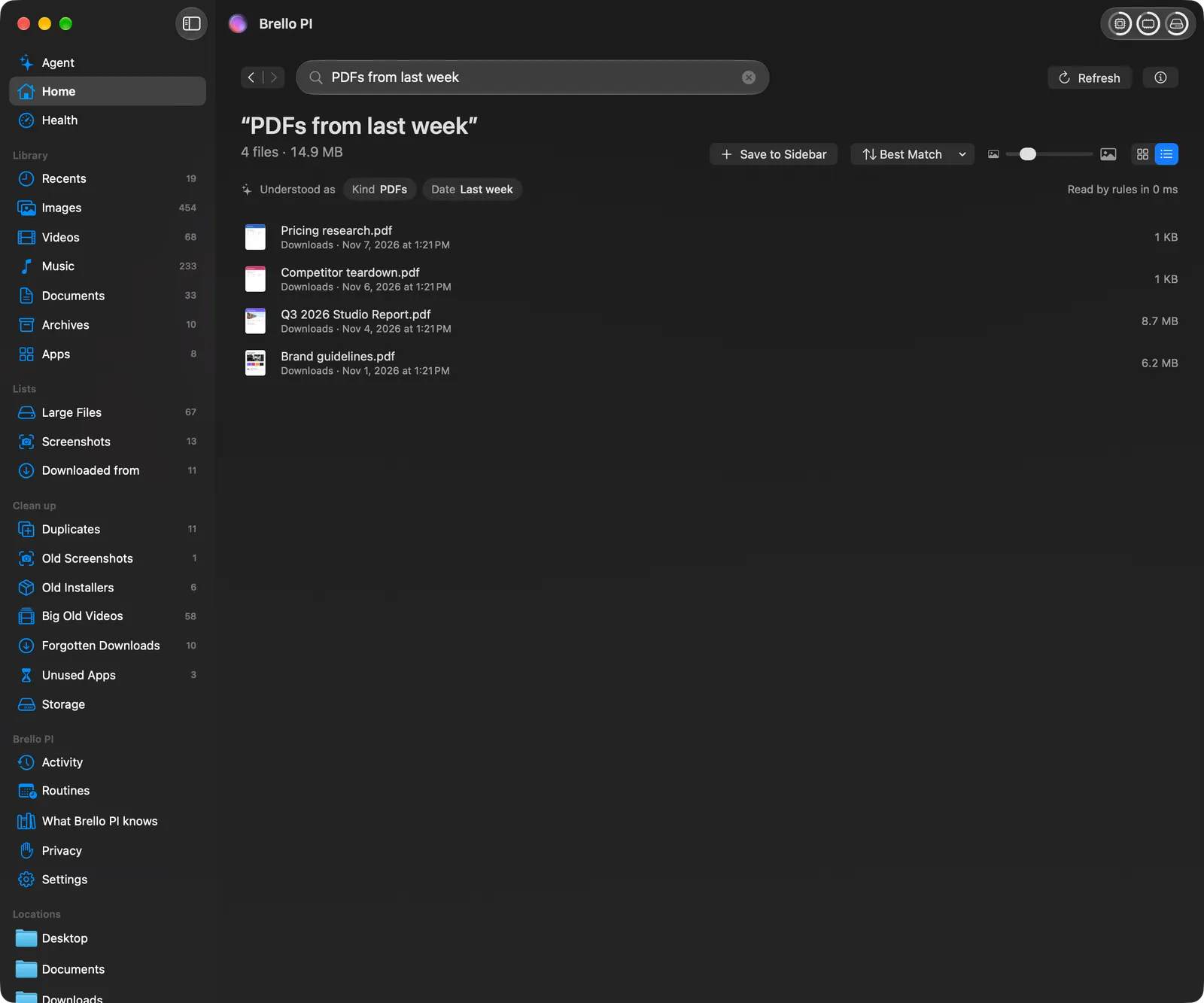
| A PDF from last week | kind:pdf and a word from it, or Finder rules: Kind is PDF, Created date within last 7 days |
“PDFs from last week” |
| A contract signed in March | A word inside it, then scroll the results | “The contract I signed in March”, read as Documents, March and “contract” |
| Big files you forgot | Finder: Other… ▸ File Size is greater than 500 MB | “Files over 500 MB”, or Clean up’s lists |
| Where a download came from | Get Info on one file at a time | Downloaded From, every download grouped by site |
| A screenshot by the words in it | Not indexed: Spotlight keeps no text from screenshots | Not by its words either; by kind and date, such as “images from yesterday” |
Brello shows how it read your words, as a kind, a date and words inside, before the files, so you can see why a file was found or wasn’t. Spotlight shows its best match first and leaves the reading to you.
What Spotlight does on macOS 27
Spotlight is much more than file search now. Apple’s guide lists opening apps and files, Quick Look with the Space bar, quick actions with Tab, a calculator, unit and currency conversions, dictionary definitions, and clipboard history of text and files you copied. With Siri AI turned on, Spotlight is also where you start a conversation with Siri. None of that is Brello PI’s job; keep it on Command-Space.
Where Spotlight is the better choice
- Everything, instantly. Apps, files, contacts, settings and quick answers, all from ⌘Space.
- When you know the name. Type a few letters and it’s there.
- It’s built in, and always running.
Where Brello helps
- Half-remembered files. Brello reads “PDFs from last week over 5 MB” or “the contract I signed in March” into a kind, a date and words, and shows you how it read them, so you can see why a file did or didn’t match.
- Searches that stay. Save a search to the sidebar with ⌘S; it keeps your words and searches again when you open it.
- Words in screenshots and photos, read on your Mac with Vision when the agent’s private index is on. It’s off until you turn it on.
- From any app. ⌥Space opens Brello PI’s popup, which finds files as you type.
Which to use when
| You want to | Use |
|---|---|
| Open an app, do a quick sum or look up a word | Spotlight |
| Find a file by its name, from anywhere | Either: Spotlight with ⌘Space, Brello PI’s popup with ⌥Space |
| Find a file by kind, date and size in one sentence, such as “PDFs from last week over 5 MB” | Brello PI’s Home |
| See files grouped by where they were downloaded from | Brello’s Downloaded From |
| Find the words in a screenshot | Brello PI, with the agent’s private index on |
| Turn a found file into finished work | Brello PI’s agent |
Using them together
Keep ⌘Space for Spotlight and ⌥Space for Brello PI, and both stay one key away. Brello PI’s Home search uses your Mac’s own index of file contents, the same one Spotlight builds, so keeping Spotlight’s index healthy helps both. If either stops finding files, see Spotlight not working.
Spotlight alternatives for Mac
| App | What it adds | Price, as each site says |
|---|---|---|
| Raycast | A launcher with a store of extensions, clipboard history, snippets, window management, and Raycast AI on paid plans | Free to start; Pro from $8 a month billed yearly |
| Alfred | A launcher with workflows you build, clipboard history and snippets in its Powerpack | Free core; Powerpack £34, or £59 with lifetime upgrades |
| Brello PI | Search by what you remember across your files, shown by kind, and work done from a sentence | $30 at launch, then $50, one time |
Spotlight on macOS 27 already searches apps, files, settings and contacts, takes actions, does sums and conversions, and keeps your clipboard history, so try it first. Raycast vs Alfred vs Spotlight.
When Spotlight can’t find a file
- The file’s folder is excluded. Open System Settings ▸ Spotlight and check Search Privacy….
- The index is still building, after an update or on a new disk: give it time; searches fill in as it finishes.
- The index is damaged: add your disk to Search Privacy, wait a moment, then remove it; Spotlight rebuilds its index.
- You remember what it was, not what it’s called: Spotlight matches words in names and contents. Brello reads “the contract I signed in March” as a kind, a date and a word. Every way to find a file.
Questions
What is the shortcut for Spotlight? Command-Space. Press it again to close.
Is there something better than Spotlight on Mac? Raycast and Alfred go further as launchers; Spotlight is free and enough for many people.
What you need for Brello
Home’s search and the popup’s file search work on any Mac with macOS 14 or later. Words in screenshots need the agent, on a Mac with Apple silicon, macOS 27 and Apple Intelligence.
We make Brello. What Spotlight does was read on November 2, 2026, on macOS 27, and from Apple’s own pages: