At a glance
| The job | Finder | Brello |
|---|---|---|
| Seeing what you have | Folder by folder | Images, videos, music, documents, archives and apps, each with its count and size |
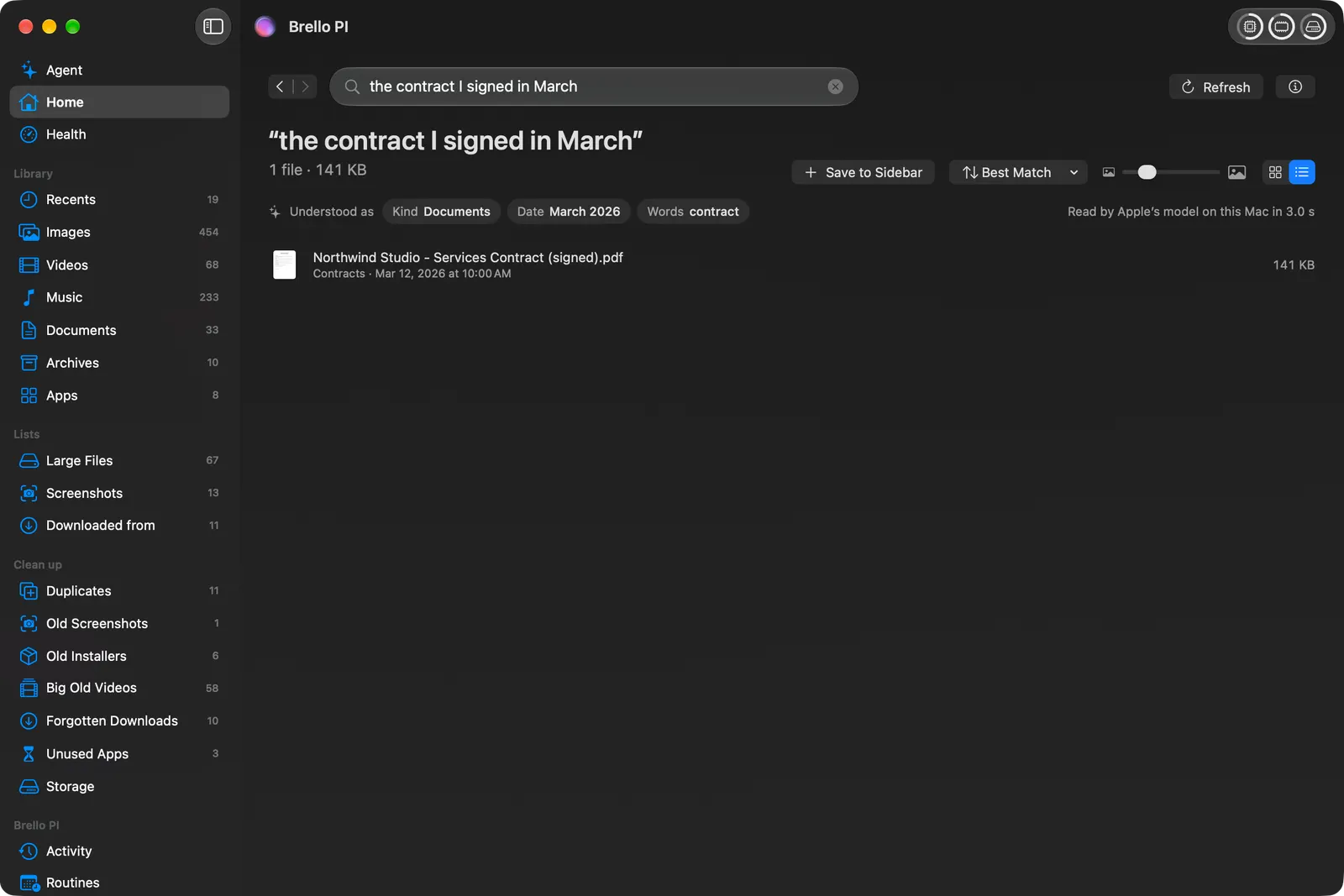
| Finding a half-remembered file | Search rules, added one at a time | Type it as you’d say it: “the contract I signed in March” is read as a kind, a date and a word |
| Where a download came from | A line in Get Info, one file at a time | Every download grouped by the site it came from |
| Duplicate copies | Nothing built in | Matched byte for byte, with the copy to keep marked |
| What’s filling your disk | System Settings ▸ General ▸ Storage, away from your files | Every kind of file measured, with what’s safe to go marked |
| Taking it back | Put Back, until the Trash is emptied | Undo for a whole request: moves, renames, settings, and files sent to the Trash |
Where Finder is the better choice
- Browsing and moving files by hand. Finder’s icon, list, column and gallery views, its tabs, and dragging between windows are the quickest way to work through a folder you know.
- Everything outside your own folders. Network servers, external disks, iCloud Drive and AirDrop all live in Finder.
- Tags, Smart Folders and Quick Actions. Finder is where you set them up and use them.
- It’s already on your Mac. Finder costs nothing and is always running.
Where Brello helps
- The whole Mac at once. Home sorts every file by kind, with counts and sizes, so you can see where your space and your work are without opening a folder.
- Search by what you remember. Brello reads the words you type as a kind, a date and words inside the file, and shows how it read them. Save any search to the sidebar with ⌘S and it searches again each time you open it.
- Downloaded From. Every download, grouped by where it came from (⇧⌘J).
- Duplicates and Clean up. Copies matched byte for byte, and lists of old installers, forgotten downloads and big old videos. Deleted files go to your Mac’s Trash, as Finder moves them there, and Undo puts them back.
Does Brello replace Finder?
No. Brello works beside Finder. It keeps Finder’s keys wherever Finder has one, and Show in Finder (⇧⌘R) opens any file in a Finder window.
Does Brello move or rename my files on its own?
No. Home shows and finds. A file goes to the Trash only when you choose Delete and say yes, and files move into folders only when you ask, for example “Tidy up my Desktop” with Brello’s agent. Undo puts every file back where it was.
Finder alternatives for Mac
People who look for a Finder replacement usually want one of three things: two folders side by side, connections to servers, or a faster way to find and sort files. What each option is for:
| App | What it adds to Finder | Price |
|---|---|---|
| ForkLift (Binarynights) | Two panes side by side; connections to SFTP, FTP, WebDAV, Amazon S3 and SMB servers, several at once; folder sync one way or both; saved multi-rename presets; an app deleter; previews. Version 4.7.7 of October 20, 2026, for macOS 14.6 or later | A free trial, then a license from its store |
| Path Finder (Cocoatech) | A long-standing Finder replacement with two panes and many power-user panels | See Cocoatech’s site |
| Terminal | Every file, including hidden ones, with commands like ls -la, mv and find |
Built in |
| Brello PI | Not a file browser: every file by kind with sizes, search by what you remember, downloads by site, duplicates, and work on files asked in a sentence | Part of Brello PI |
You may not need another app: Finder already has tabs (Command-T), a column view (Command-3), a path bar (View ▸ Show Path Bar), hidden files (Shift-Command-period), Rename for many files at once, and Smart Folders that save a search. Show hidden files and the path bar and rename many files at once.
Questions
Can I replace Finder on a Mac? Not fully: Finder always runs and draws the Desktop. Apps like ForkLift and Path Finder open in its place for browsing, beside it.
What is the best file manager for Mac? For servers and two panes, ForkLift; for finding and cleaning up your own files, Brello beside Finder; for everything else, Finder itself.
How do I find a file on a Mac when I don’t know its name? Spotlight searches inside files; Brello reads a description like “the PDF from my bank last month”. How to find any file on a Mac.
What you need
Home, its search, Duplicates, Downloaded From and Clean up work on any Mac with macOS 14 or later. Asking Brello PI to tidy a folder uses the agent, which needs a Mac with Apple silicon, macOS 27 and Apple Intelligence.
We make Brello. What Finder does was read on November 2, 2026, on macOS 27, and from Apple’s own pages: