What CleanMyMac is
CleanMyMac is MacPaw’s Mac cleaner. Its site, read on November 2, 2026, lists version 5.5.7 of July 22, 2026, for macOS 11 or later, notarized by Apple, with a free trial and prices from $3.33 a month. It’s built around Smart Care, one click that runs five jobs together: a deep clean, a threat scan, a performance boost, software updates and storage decluttering. Its other modules:
- Free up space: clears hidden system junk.
- Protection: finds and removes malware.
- Performance: controls memory and processor load.
- Uninstaller: removes apps with their leftover data, and updates your apps.
- Clutter: duplicates, similar photos and large, forgotten files.
- Cloud storage: large files in the cloud, and local copies you don’t need.
Is it safe? Yes: it’s made by a long-established company and notarized by Apple. The risk with any cleaner is deleting something you needed, so read its lists before you confirm. Is CleanMyMac safe? The longer answer.
Is there a free version? Its site offers a free trial, not a free version. Check the current plans there, since they change.
At a glance
| CleanMyMac | Brello | |
|---|---|---|
| What it’s for | Cleaning and maintaining your Mac | Your files, your Mac’s health, and work done for you |
| Caches and logs | Clears hidden system junk | Clears apps’ caches, developer caches, and logs and crash reports over 30 days, after one question; leaves macOS’s own caches to macOS |
| Malware | Scans for it and removes it | Doesn’t scan for malware |
| Uninstalling apps | Removes apps and what they leave behind | Lists apps you haven’t opened in 6 months; you remove them |
| Your own files | Finds large files, duplicates and similar photos | Every file by kind, search by what you remember, Downloaded From, duplicates byte for byte |
| Deleting your files | Its own cleanup | Only the files you approve, into the Trash, with Undo |
| Mac health | Performance tools | Live readings in plain words, what keeps it awake, Balance the load |
| Work done for you | No | An agent: expense reports from receipts, filing, renaming, settings, routines |
| Needs | macOS 11 or later | macOS 14 or later; the agent needs Apple silicon, macOS 27 and Apple Intelligence |
| Price, as each site says | From $3.33 a month, with a free trial | $30 at launch, then $50, one time, for up to 3 Macs; 30-day refunds |
Where CleanMyMac is the better choice
- Everything in one click. Smart Care runs cleanup, a malware scan, maintenance and updates together.
- Malware. CleanMyMac scans for malware and removes it. Brello doesn’t.
- Uninstalling apps completely. CleanMyMac removes an app with the files it leaves behind. Brello lists apps you haven’t used; you remove them. How to uninstall apps completely.
- Similar photos and cloud storage. Its clutter tools look at near-identical photos and your cloud drives.
- Older Macs. It runs on macOS 11 and later.
Where Brello helps
- Seeing what you actually have. Home sorts every file on your Mac by kind, each with its count and size, and finds a file by what you remember, such as “the contract I signed in March”.
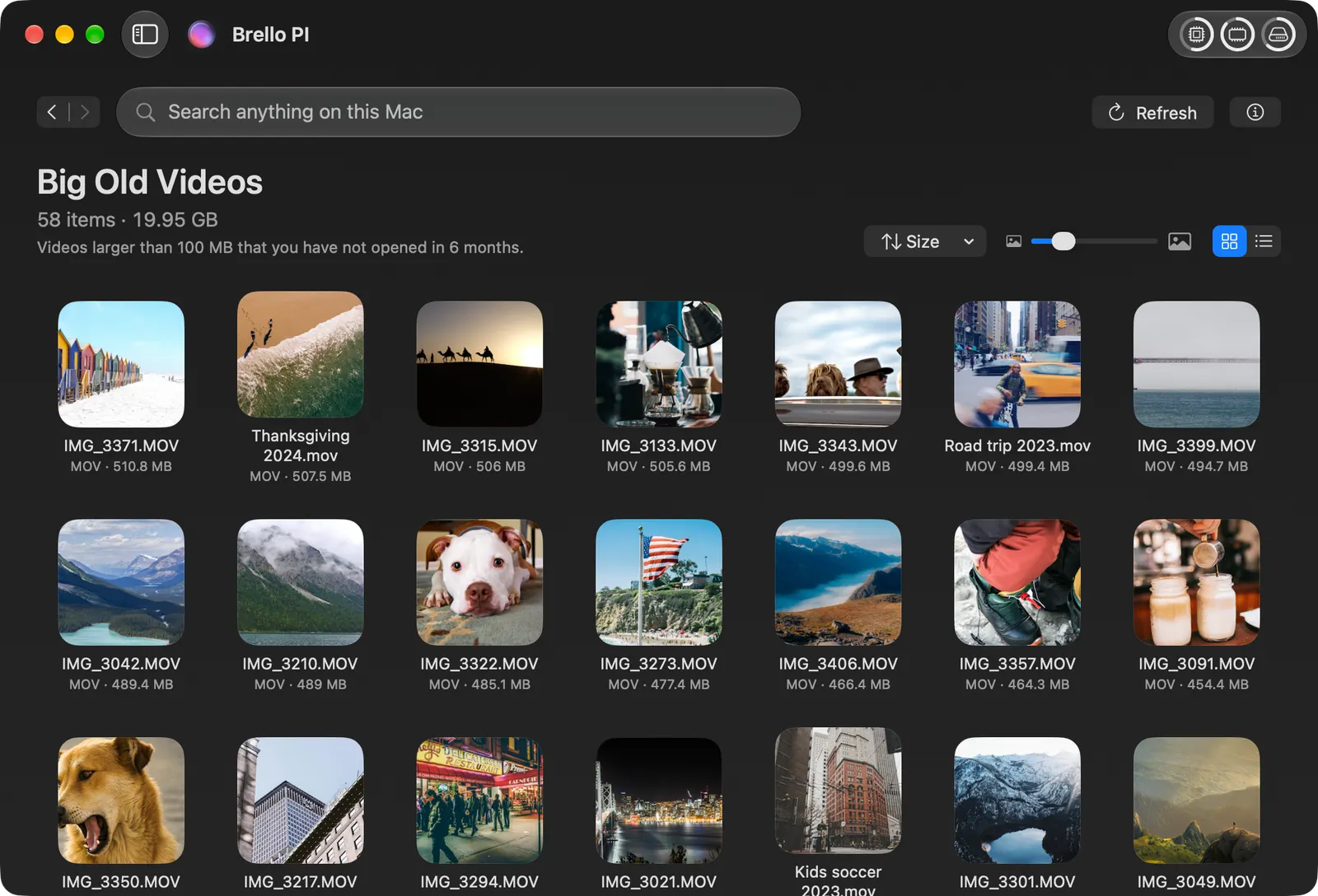
- Free space in one sentence, with every item named. Ask “free up space” or “clean my mac”: Brello PI lists the caches apps make again and the old logs, each with its size, in one question, and clears them on your yes. Clean up lists your own big old videos, forgotten downloads, old installers, old screenshots and duplicates by name and size; nothing of yours goes until you say yes, and then it goes to the Trash, with Undo.
- Your Mac’s health in plain words. Health shows the processor, memory pressure, disk and heat live, says what’s keeping the Mac awake, and Balance the load moves your own background work to the efficiency cores in one click, with Undo.
- Work done for you. Ask in plain words: tidy a folder, turn receipts into an expense report, convert a Word document to PDF, close all your apps, or change several settings at once.
- One price. No subscription.
CleanMyMac alternatives, free and paid
None of these does everything CleanMyMac bundles, so pick by the job you need done.
| Best for | Price, as each site says | |
|---|---|---|
| macOS Storage settings | A first look at what fills your disk, built in | Free |
| DaisyDisk | Seeing the whole disk as a map of folders | $9.99, one time |
| OnyX | Maintenance tasks and clearing caches | Free, with donations |
| AppCleaner | Removing an app with the files it leaves behind | No price stated; donations welcome |
| Brello PI | Your own files, what’s safe to delete, Mac Health and an agent | $30 at launch, then $50, one time |
| CleanMyMac, for reference | Junk, malware and apps in one subscription | From $3.33 a month |
macOS Storage settings
Open System Settings ▸ General ▸ Storage. macOS shows what fills your disk by category, offers recommendations such as Store in iCloud, Optimize Storage and Empty Trash Automatically, and lets you review and delete large files and apps. It’s free and already on your Mac, so it’s the right first stop. It doesn’t find duplicates or tell you which files are safe to delete; you judge each one.
DaisyDisk
DaisyDisk scans a disk and draws its folders as rings you can click into, which makes it quick to spot the one folder taking all the space. It can scan cloud disks such as Dropbox and Google Drive, and it costs $9.99, one time, on up to 5 personal Macs. It shows where space goes; deciding what to delete is up to you. DaisyDisk and its alternatives.
OnyX
OnyX, by Titanium Software, is a free multifunction utility: it checks the system’s file structure, runs cleaning and maintenance tasks, deletes caches, rebuilds databases and indexes, and adjusts hidden settings in Finder, the Dock and Safari. Each macOS version has its own OnyX; version 5.1.1 is for Macs with Apple silicon on macOS 27. It’s powerful and aimed at people who know what each task does.
AppCleaner
AppCleaner removes an app thoroughly: drop it onto the window and it finds the related files for you to delete with it. Version 3.7 supports macOS 15 and later, with older versions for older macOS. It does one job, uninstalling, and does it well.
More free tools for space
- GrandPerspective: draws your disk as a treemap, each file a rectangle sized by the space it takes. Open source; version 3.8.1 of September 13, 2026, for macOS 14 or later. Free from SourceForge, or $2.99 in the App Store for the same app.
- OmniDiskSweeper, from The Omni Group: lists files largest to smallest, folder by folder, to open or move to the Trash.
- Terminal:
du -sh ~/* | sort -hlists your home folder’s folders by size, largest last.
Which to choose
- Just checking what’s using space: macOS Storage settings, then DaisyDisk for a map.
- Caches and maintenance tasks: OnyX.
- Removing an app completely: AppCleaner.
- Knowing what’s safe to delete among your own files, plus your Mac’s health and work done for you: Brello.
- All of it in one subscription, malware scans included: CleanMyMac itself.
What to look for in any Mac cleaner
- It shows what it will delete, item by item, before it deletes anything.
- It says what comes back: caches apps rebuild, logs that don’t matter, and your own files, which don’t.
- It’s notarized by Apple, which macOS checks when you open it, and it comes from its maker’s own site or the App Store.
- It doesn’t scare you into paying. Warnings of thousands of “problems” are a sales tactic, not a diagnosis. Is MacKeeper safe?
- It leaves macOS’s own files alone. macOS manages its caches and System Data itself.
Do you need a Mac cleaner at all?
Not to keep a Mac healthy. macOS clears its own caches and logs as it needs to, frees purgeable space when an app needs room, and has built-in malware protection that Apple updates. What a Mac can’t decide for you is which of your own files you no longer need: old downloads, big videos, duplicate copies. A cleaner earns its place when your disk is full and you want help finding that, or when you want one click for maintenance. How to free up space on a Mac without an app.
Can I use both?
Yes. CleanMyMac for its malware scan and uninstaller, Brello for your files, your Mac’s health and the work you hand off. Let one of them clear caches, not both.
Questions
Is CleanMyMac worth it? If you want malware scanning, an uninstaller and one-click maintenance together, and you’re happy with a subscription, yes. If your goal is space, macOS’s Storage settings and a look at your own large files go a long way for free.
How much does CleanMyMac cost? From $3.33 a month, as its site says, with a free trial. Brello PI is $20 at launch, then $50, one time.
What’s a free alternative to CleanMyMac? For space: macOS’s own Storage settings, GrandPerspective to see what’s large, and AppCleaner to remove apps. For maintenance: OnyX.
What is the best free Mac cleaner? For space, macOS’s Storage settings plus GrandPerspective or OmniDiskSweeper to find large files; for maintenance, OnyX; for removing apps, AppCleaner.
Is CleanMyMac the same as MacKeeper? No. They’re different apps from different companies. Is MacKeeper safe?.
What you need for Brello
Home, Clean up and Health work on any Mac with macOS 14 or later. The agent needs a Mac with Apple silicon, macOS 27 and Apple Intelligence.
We make Brello. What CleanMyMac does and costs was read from its maker’s own site on November 2, 2026, and may have changed since: