At a glance
| Activity Monitor | Brello Health | |
|---|---|---|
| How it reads | Tables of processes, five tabs | Cards in plain words, live every second |
| Memory | Memory Pressure graph and its parts | Apps, Kept by macOS, Compressed and Swap, with the pressure in words |
| What keeps the Mac awake | The Preventing Sleep column | Each app in its own words, how long, and when the Mac will sleep after |
| History | The last 12 hours of energy | The hour, day, week and month, kept on your Mac |
| Acting on it | Quit or force quit a process | Balance the load, with Undo |
| Sampling a process | Yes | No |
| Every process, including macOS’s | Yes | The ones using the most |
| Cost | Built in | $30 at launch, then $50, one time |
Where Activity Monitor is the better choice
- Every process, every column. It shows each process of every user, with threads, ports, open files and more in its Inspect window.
- Sampling a stuck process, which developers ask for in bug reports.
- Force quitting anything you need to stop now.
- It’s built in.
Where Brello Health helps
- Plain words. “Pressure: Normal · Apps have the memory they need.” “The chip is running cool.” You don’t need to know what Wired Memory is.
- Why it won’t sleep. Each app keeping your Mac awake, what it’s doing, for how long, and when the Mac will sleep once it lets go.
- A history of the processor, memory and more over the hour, day, week and month, kept on your Mac and left out of backups.
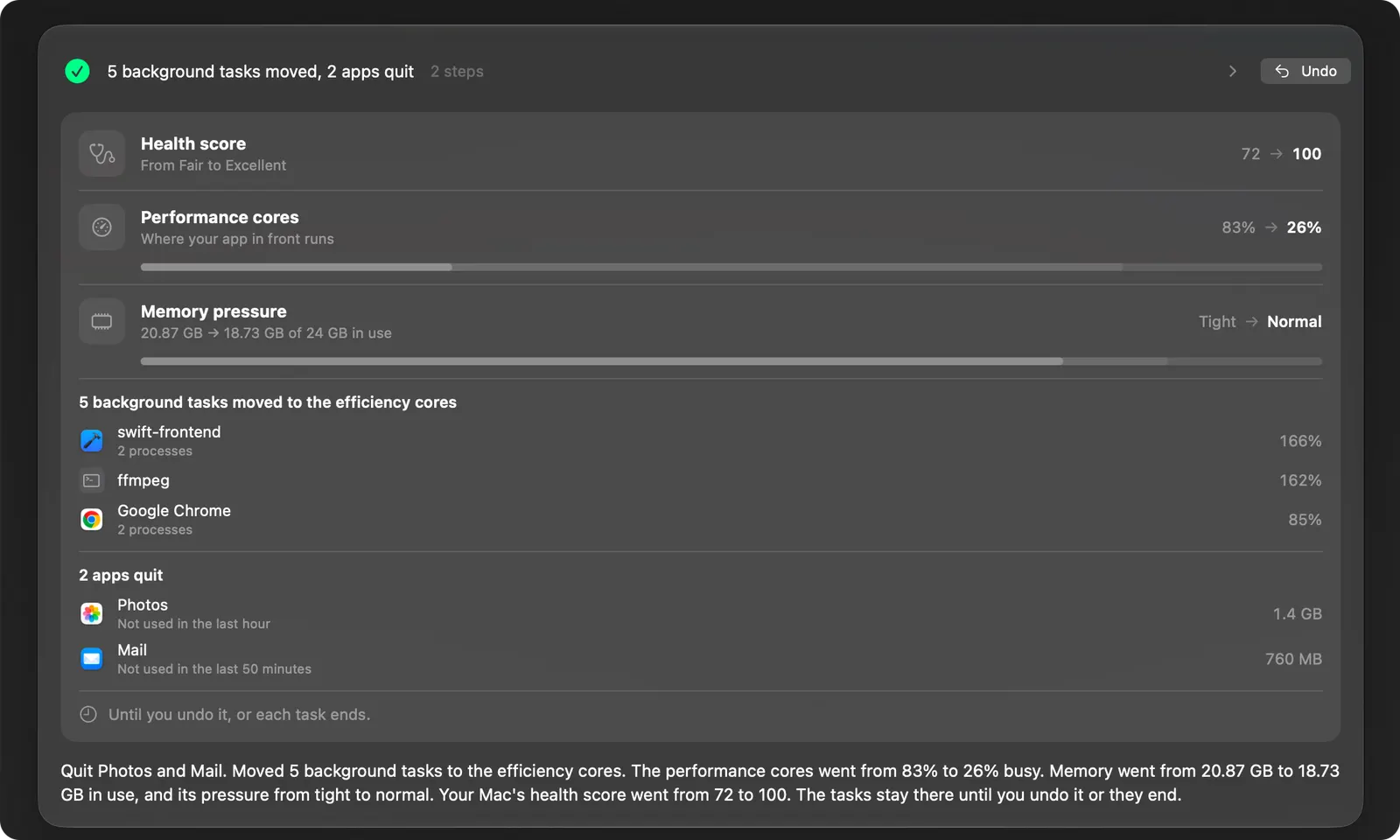
- Balance the load. One click moves your own heavy background work to the efficiency cores, and asks before quitting apps you haven’t used when memory is tight. It never touches macOS’s own processes, and Undo puts every task back.
Which to use when
| You want to | Use |
|---|---|
| See every process, including the system’s, with every column | Activity Monitor |
| Sample a process, or inspect its open files and ports | Activity Monitor |
| See whether apps have the memory they need, in plain words | Brello’s Health |
| See what’s keeping the Mac awake, and for how long | Brello’s Health, Sleep card |
| Move your own heavy background work off the performance cores in one click | Brello’s Balance the load |
| Be told when an app runs away | Brello’s Health alerts |
| Ask about your Mac’s health, and get one plain answer | Brello PI, with the agent |
Using them together
Activity Monitor is the instrument; Health is the summary. Start with Health to see what matters, then open Activity Monitor when you need a process’s full detail. Both read the same counters macOS provides, so their figures agree, with one exception: for another user’s process, macOS gives only its resident size, which Brello marks.
Alternatives to Activity Monitor
| App | What it adds | Price |
|---|---|---|
| Brello Health | Plain words in place of columns, history kept on your Mac, what keeps it awake, Balance the load | Part of Brello |
| iStat Menus | Readings, graphs and alerts in the menu bar, fan control | 14-day trial, then a license, as Bjango’s site says |
| Stats | iStat-style readings in the menu bar, open source | Free |
top in Terminal |
Live processes by processor use, built into macOS: type top -o cpu, press Q to quit |
Free |
Activity Monitor is still the one to open when an app misbehaves: it shows every process, macOS’s own included, and can quit any of them. How to force quit an app.
Questions
What is the Mac version of Task Manager? Activity Monitor, in Applications ▸ Utilities. Press Option-Command-Esc for the quick Force Quit window instead.
How do I open Activity Monitor? Press Command-Space, type “Activity Monitor” and press Return, or open Applications ▸ Utilities.
Can Activity Monitor show my Mac’s temperature? No. It shows the processor, memory, energy, disk and network, not heat or fan speeds. Brello’s Health says how warm the Mac is in plain words, Normal, Warm, Hot or Very hot; iStat Menus and Stats show the sensors in degrees. Why a MacBook runs hot.
Is it safe to quit processes in Activity Monitor? Quitting an app you opened is safe; you lose only what you hadn’t saved. Leave processes you don’t recognize alone, especially ones owned by root or _windowserver: stopping them can log you out or make macOS start them again.
Why does my Mac show “Your system has run out of application memory”? Memory and swap have run out, usually because the disk is nearly full or one app is using too much. What to do.
What you need for Brello
Health works on any Mac with macOS 14 or later. With the agent, “what’s using my memory?” gets a plain answer; the agent needs a Mac with Apple silicon, macOS 27 and Apple Intelligence.
We make Brello. What Activity Monitor does was read on November 2, 2026, on macOS 27, and from Apple’s own pages: